SQL Joins 🔗📊🔑
Two tables. One shared key. Infinite answers. JOIN links separate tables together to give you the complete picture!
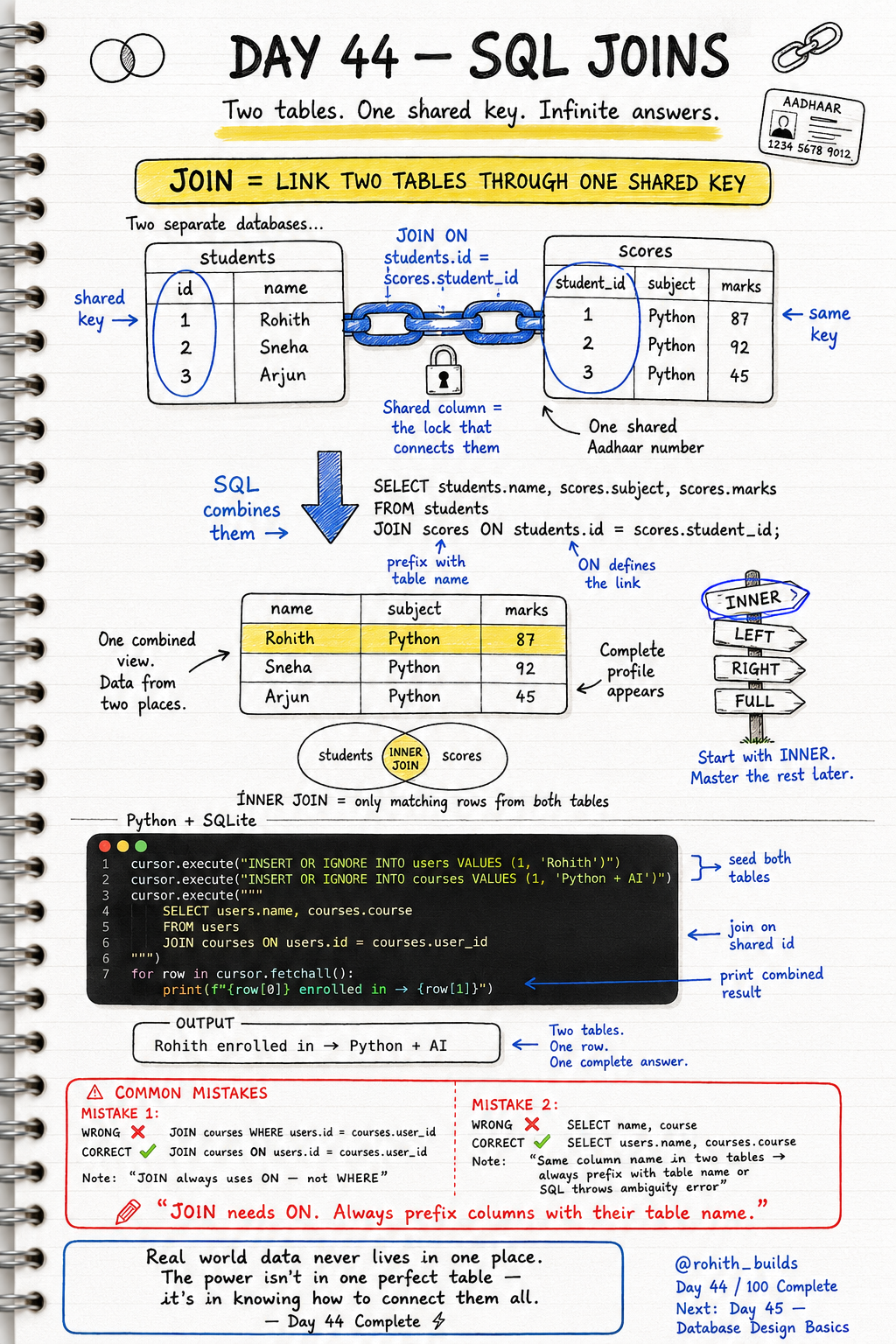
Day 44: SQL Joins — Connect Two Tables Into One Answer!
Why Do We Need Joins?
Real world data never lives in one place. Instagram stores users in one table and posts in another. Zomato stores customers in one table and orders in another. Why? Because separating data avoids repetition and keeps things clean. But when you need the full picture — which user made which order — you need to connect the tables. That's exactly what JOIN does!
The Shared Key — The Lock That Connects
Think of Aadhaar. Your name is in one government database. Your tax records are in another. Your passport is in another. But they're all linked by one shared number — your Aadhaar ID. SQL tables work the same way. A shared column called a key links them together. students has an id. scores has a student_id. Same value, different tables — JOIN connects them!
Your First JOIN
import sqlite3

conn = sqlite3.connect("rohithbuilds.db")
cursor = conn.cursor()

cursor.execute("INSERT OR IGNORE INTO users VALUES (1, 'Rohith')")
cursor.execute("INSERT OR IGNORE INTO courses VALUES (1, 'Python + AI', 1)")
conn.commit()

cursor.execute("""
    SELECT users.name, courses.course
    FROM users
    JOIN courses ON users.id = courses.user_id
""")

for row in cursor.fetchall():
    print(f"{row[0]} enrolled in -> {row[1]}")
Output: Rohith enrolled in Python + AI. Two separate tables. One JOIN query. One complete answer. ON users.id = courses.user_id is the lock — it tells SQL exactly how to connect them!
The Full Students and Scores Example
cursor.execute("""
    SELECT students.name, scores.subject, scores.marks
    FROM students
    JOIN scores ON students.id = scores.student_id
    ORDER BY scores.marks DESC
""")

for row in cursor.fetchall():
    print(f"{row[0]} | {row[1]} | {row[2]}")
Output: Sneha Python 92, Rohith Python 87, Arjun Python 45. Name from students table. Subject and marks from scores table. Combined into one clean result sorted by marks. That's the power of JOIN!
Real World Connection
Every time you open Swiggy and see your order history with your name and the restaurant name — that's a JOIN between the users table and the orders table. When Netflix shows your watchlist with movie titles and your rating — JOIN between users and movies. When your school shows your name next to your grades — JOIN between students and results. Joins power every combined view in every app!
Common Mistakes
Mistake 1 — Using WHERE instead of ON.
JOIN courses WHERE users.id = courses.user_id   -- WRONG!
JOIN courses ON users.id = courses.user_id      -- CORRECT — JOIN always uses ON!
Mistake 2 — Not prefixing column names with table name.
SELECT name, course FROM users JOIN courses...      -- WRONG — which table is name from?
SELECT users.name, courses.course FROM users...     -- CORRECT — always prefix!
Mini Challenge
Mini Challenge
Create two tables — students with id and name, and grades with student_id and subject and marks. Insert 3 students and their grades. Write a JOIN query to show each student's name alongside their subject and marks sorted highest first. You just built the same result system every school management app uses!
Quick Quiz
Q: What keyword connects the two tables in a JOIN? A: ON — JOIN tablename ON table1.key = table2.key!
Q: Why must you prefix column names with their table name in a JOIN? A: Two tables can have the same column name — prefixing removes the ambiguity!
Q: What does INNER JOIN return? A: Only rows that have a matching key in both tables — no orphan rows!
Key Takeaways
Key Takeaways
- JOIN connects two tables through a shared key column.
- Always use ON to define the link — never WHERE for joins.
- Always prefix columns with their table name — users.name not just name.
- INNER JOIN returns only rows with matching keys in both tables.
- Real world data lives in multiple tables — JOIN is how you bring it all together!
Continue Learning with Rohi
You've used your 3 free Rohi questions. Create a free account to continue learning.