Python + SQLite 🗄️📓⚡
One file. Zero setup. Full database power. SQLite is Python's personal diary — open, write, read, close. No server needed!
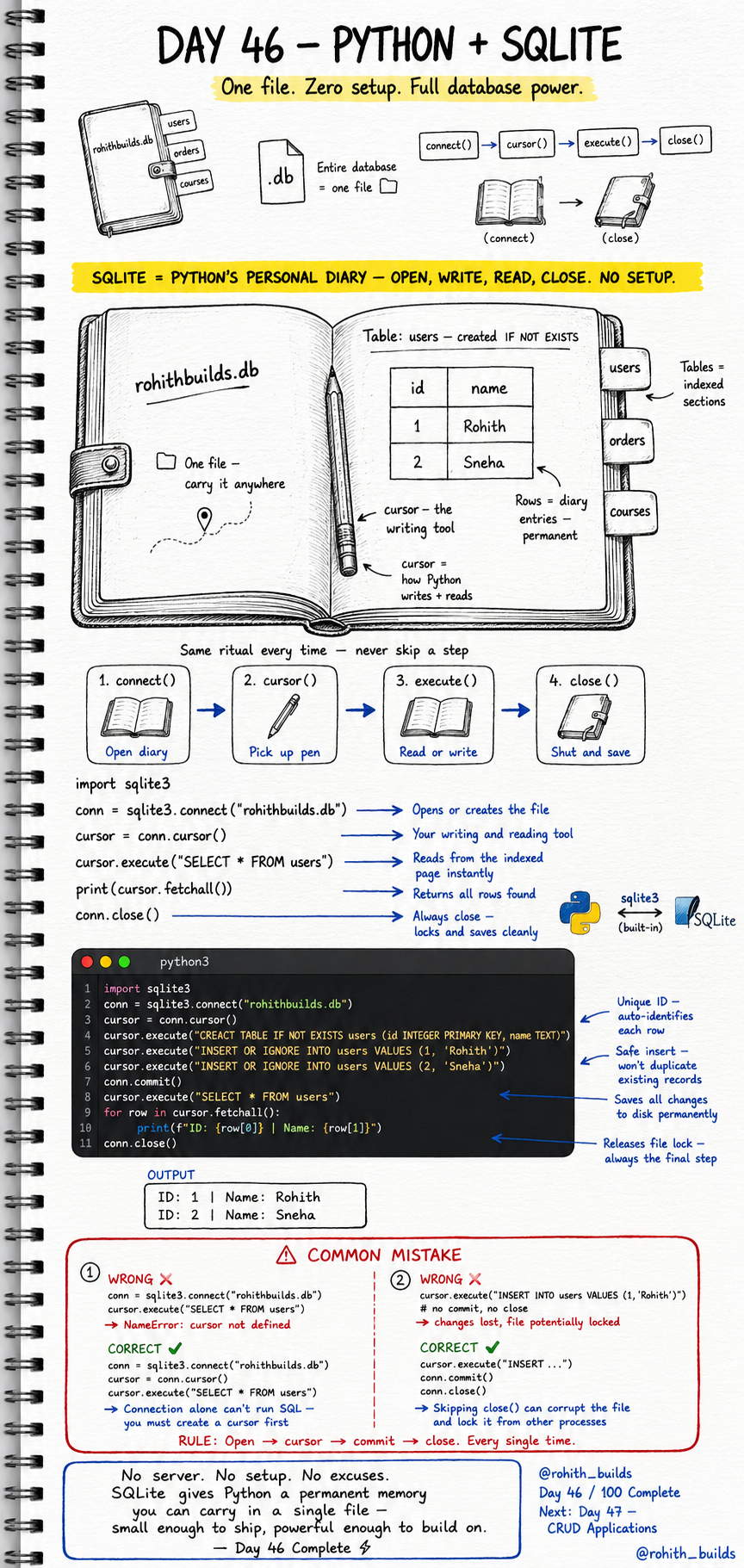
Day 46: Python + SQLite — Your Database in One File!
What Makes SQLite Special?
Most databases need a server, installation, configuration. SQLite needs none of that. The entire database is one single file on your computer. No setup. No server. No excuses. It comes built into Python — just import sqlite3 and you have full database power instantly. Small enough to carry anywhere, powerful enough to build real apps on!
The Four-Step Ritual — Never Skip a Step
Step 1 — connect() opens the diary. Step 2 — cursor() picks up the pen. Step 3 — execute() reads or writes. Step 4 — close() shuts and saves. Same ritual every time. Skip any step and things break or data gets lost!
The Complete Python + SQLite Flow
import sqlite3

conn = sqlite3.connect("rohithbuilds.db")
cursor = conn.cursor()

cursor.execute("CREATE TABLE IF NOT EXISTS users (id INTEGER PRIMARY KEY, name TEXT)")
cursor.execute("INSERT OR IGNORE INTO users VALUES (1, 'Rohith')")
cursor.execute("INSERT OR IGNORE INTO users VALUES (2, 'Sneha')")
conn.commit()

cursor.execute("SELECT * FROM users")
for row in cursor.fetchall():
    print(f"ID: {row[0]} | Name: {row[1]}")

conn.close()
Output: ID: 1 Name: Rohith, ID: 2 Name: Sneha. connect() opens or creates the file. cursor() is your writing and reading tool. commit() saves changes permanently to disk. close() releases the file lock — always the final step!
Why Each Step Matters
connect() without cursor() means you have the diary open but no pen — you can't write anything. execute() without commit() means changes exist only in memory — close the program and they vanish. close() without commit() can corrupt the file and lock it from other processes. The ritual exists for good reasons. Respect it every time!
Real World Connection
WhatsApp stores all your messages in a SQLite file on your phone. Your browser stores bookmarks and history in SQLite. iOS apps, Android apps, desktop apps — SQLite is everywhere because it's the perfect zero-setup database. When you build your first real app, SQLite is where you start. When that app needs to scale to millions, you graduate to PostgreSQL. But the SQL you write stays exactly the same!
Common Mistakes
Mistake 1 — Using cursor before creating it.
conn = sqlite3.connect("rohithbuilds.db")
cursor.execute("SELECT * FROM users")   # WRONG — cursor not defined yet!

conn = sqlite3.connect("rohithbuilds.db")
cursor = conn.cursor()                  # CORRECT — create cursor first!
cursor.execute("SELECT * FROM users")
Mistake 2 — Skipping commit and close.
cursor.execute("INSERT INTO users VALUES (1, 'Rohith')")
# WRONG — no commit, no close — data lost, file possibly locked!

cursor.execute("INSERT INTO users VALUES (1, 'Rohith')")
conn.commit()    # saves to disk
conn.close()     # releases file lock — CORRECT!
Mini Challenge
Mini Challenge
Create a database called myapp.db. Create a products table with id, name and price. Insert 3 products. Fetch and print all of them. Then close the program completely and run it again — your products are still there! You just proved that SQLite gives your Python app permanent memory in a single file!
Quick Quiz
Q: What does conn.cursor() do? A: Creates the tool that writes and reads SQL commands — your pen for the diary!
Q: What happens if you skip conn.commit()? A: Your changes exist only in memory and vanish when the program closes!
Q: Why always call conn.close() at the end? A: Releases the file lock so other processes can access it safely!
Key Takeaways
Key Takeaways
- SQLite is one file — no server, no setup, built into Python.
- The ritual is always: connect, cursor, execute, commit, close.
- commit() saves to disk. Without it changes disappear on exit.
- close() releases the file lock — always the final step.
- WhatsApp, browsers, mobile apps — SQLite powers them all. Now it powers yours too!
Continue Learning with Rohi
You've used your 3 free Rohi questions. Create a free account to continue learning.