DB Design 📐🏗️🔑
Plan your tables like an architect plans rooms. Design first, code second — or you'll rebuild everything later!
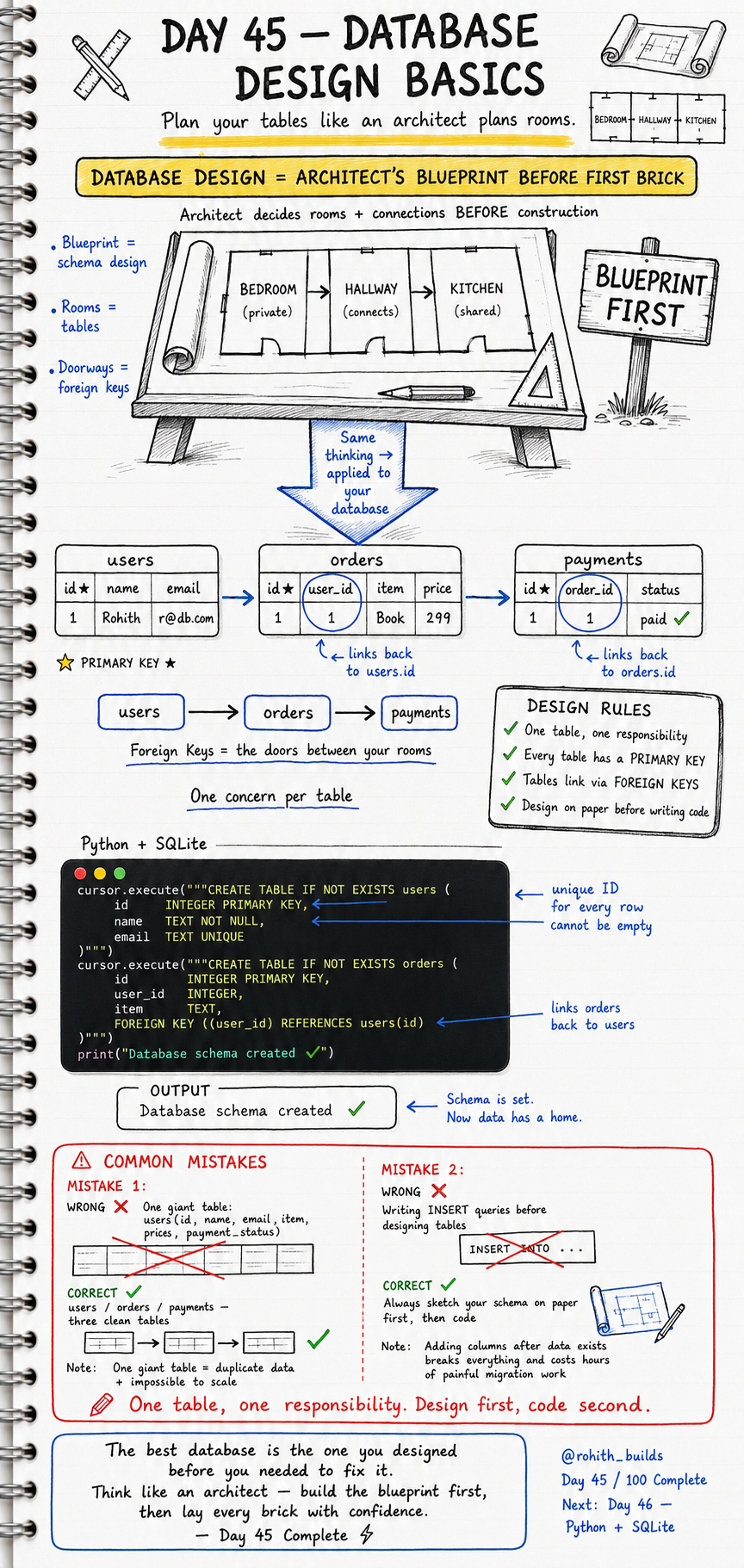
Day 45: Database Design — Blueprint Before First Brick!
Why Design First?
An architect never lays bricks before drawing the blueprint. They plan every room, every doorway, every connection first. Building a database without a design is exactly the same mistake — you'll end up with messy data, duplicate information, and a system impossible to scale. Design your tables on paper first, then write one line of code. Every professional does this!
The Four Golden Design Rules
One table, one responsibility. Every table has a PRIMARY KEY. Tables link via FOREIGN KEYS. Always design on paper before writing code. Follow these four rules and your database will never break under pressure!
Primary Keys — Every Row's Unique ID
cursor.execute("""CREATE TABLE IF NOT EXISTS users (
    id    INTEGER PRIMARY KEY,
    name  TEXT NOT NULL,
    email TEXT UNIQUE
)""")
id is the PRIMARY KEY — a unique number for every row. No two users can ever have the same id. NOT NULL means name can never be empty. UNIQUE means no two users can share the same email. These constraints protect your data automatically!
Foreign Keys — Doors Between Tables
cursor.execute("""CREATE TABLE IF NOT EXISTS orders (
    id      INTEGER PRIMARY KEY,
    user_id INTEGER,
    item    TEXT,
    FOREIGN KEY (user_id) REFERENCES users(id)
)""")

print("Database schema created!")
user_id is a FOREIGN KEY — it's a door that connects orders back to users. Every order knows which user placed it. Users table stores who you are. Orders table stores what you bought. Two clean tables, one connection — that's good design!
The Full Three-Table Design
users stores who people are — id, name, email. orders stores what they bought — id, user_id, item, price. payments stores how they paid — id, order_id, status. Three tables. Three responsibilities. Each table does one job perfectly. Foreign keys connect them like doors between rooms!
Real World Connection
Amazon has a users table, a products table, an orders table, a payments table and a delivery table. Each one does exactly one job. They connect through foreign keys. When you order something, a row is created in orders with your user_id and the product_id. When you pay, a row is created in payments with that order_id. Clean, scalable, professional design!
Common Mistakes
Mistake 1 — One giant table for everything.
-- WRONG — one messy table!
users(id, name, email, item, price, payment_status)

-- CORRECT — three clean tables!
users / orders / payments
Mistake 2 — Writing INSERT queries before designing tables.
Always sketch your schema on paper first. Adding columns after data exists breaks everything and costs hours of painful migration work. Design first. Code second. Every time!
Mini Challenge
Mini Challenge
Design and create three tables on paper first — students (id, name, email), subjects (id, subject_name), and grades (id, student_id, subject_id, marks). Then write the CREATE TABLE code with PRIMARY KEYS and FOREIGN KEYS. Insert one student, one subject and one grade. You just designed a real school database schema exactly how professional developers do it!
Quick Quiz
Q: What is a PRIMARY KEY? A: A unique ID for every row — no two rows can ever share the same primary key!
Q: What is a FOREIGN KEY? A: A column that links one table to another — the door between rooms!
Q: Why split data into multiple tables instead of one big table? A: One table per responsibility — avoids duplicate data and makes the system scalable!
Key Takeaways
Key Takeaways
- Design your database on paper before writing a single line of code.
- One table, one responsibility — never mix concerns in one giant table.
- Every table needs a PRIMARY KEY — a unique ID for every row.
- FOREIGN KEYS are the doors that connect tables to each other.
- The best database is the one you designed before you needed to fix it!
Continue Learning with Rohi
You've used your 3 free Rohi questions. Create a free account to continue learning.