Pandas Introduction 🐼📊⚡
Excel for programmers. Infinite scale. Zero mouse clicks. Pandas turns any dataset into a conversation — and you're finally fluent!
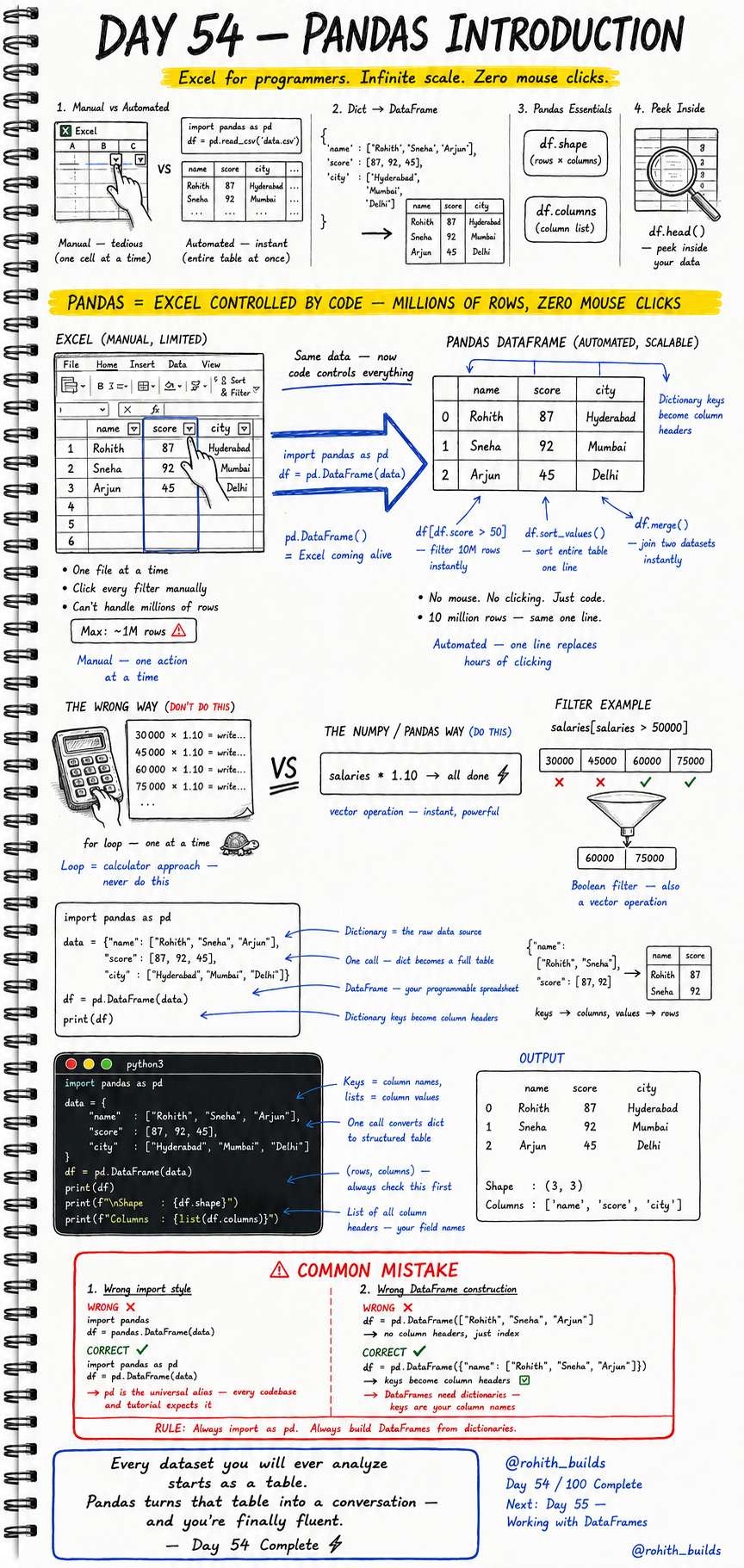
Day 54: Pandas — Excel Controlled by Code!
What Is Pandas?
Open Excel. Click a cell. Type a formula. Click another. Filter manually. Sort manually. One file at a time. Maximum one million rows. That's manual and limited. Now imagine controlling that entire spreadsheet with one line of code. Filter 10 million rows instantly. Sort the whole table in one expression. Merge two datasets automatically. That's Pandas — Excel coming alive through code. No mouse. No clicking. Just power!
Your First DataFrame
import pandas as pd

data = {
    "name"  : ["Rohith", "Sneha", "Arjun"],
    "score" : [87, 92, 45],
    "city"  : ["Hyderabad", "Mumbai", "Delhi"]
}

df = pd.DataFrame(data)
print(df)
Output: A clean table with name, score and city columns. Dictionary keys become column headers. Lists become rows. One call converts your dictionary into a fully structured programmable spreadsheet — your DataFrame!
Exploring Your DataFrame
print(f"Shape   : {df.shape}")
print(f"Columns : {list(df.columns)}")
print(df.head())
df.shape tells you rows and columns — always check this first. df.columns gives you every column header. df.head() peeks at the first 5 rows. These three are your first move every time you open any dataset. Know your data before you touch it!
Real World Connection
When a data scientist at Zomato analyzes 50 million orders, they load it into a DataFrame. When IPL analysts find the best batting average, they use Pandas on match data. When a bank detects fraud patterns, they filter transaction DataFrames. When Netflix decides which shows to produce, they analyze viewing DataFrames with millions of rows. Every data job in every company starts with pd.DataFrame() and ends with insights!
What DataFrames Can Do
# Filter rows — instant on millions of rows
passing = df[df["score"] > 50]

# Sort entire table in one line
sorted_df = df.sort_values("score", ascending=False)

# Get one column
names = df["name"]

print(passing)
print(sorted_df)
df[df["score"] > 50] filters in one expression — no loop needed. sort_values() sorts the entire table by any column instantly. df["name"] extracts one full column. These three operations alone replace hours of manual Excel clicking!
Common Mistakes
Mistake 1 — Wrong import style.
import pandas
df = pandas.DataFrame(data)    # WRONG — every tutorial expects pd!

import pandas as pd
df = pd.DataFrame(data)        # CORRECT — pd is the universal alias!
Mistake 2 — Building DataFrame from a list instead of a dictionary.
df = pd.DataFrame(["Rohith", "Sneha", "Arjun"])  # WRONG — no column headers!

df = pd.DataFrame({"name": ["Rohith", "Sneha", "Arjun"]})  # CORRECT — keys become headers!
Mini Challenge
Mini Challenge
Create a DataFrame of 5 products with name, price and category columns. Print the shape and columns. Filter only products above 500 rupees. Sort by price highest first. Print both results. You just built the product catalogue analysis system that every e-commerce data team runs every single day!
Quick Quiz
Q: How do you check the number of rows and columns in a DataFrame? A: df.shape — returns (rows, columns) as a tuple!
Q: How do you filter a DataFrame for scores above 50? A: df[df["score"] > 50] — boolean filter, same vector thinking as NumPy!
Q: Why must you always import pandas as pd? A: pd is the universal alias — every codebase, tutorial and company uses it!
Key Takeaways
Key Takeaways
- Pandas is Excel controlled by code — millions of rows, zero mouse clicks.
- Always import as pd — import pandas as pd is universal.
- Build DataFrames from dictionaries — keys become column headers.
- df.shape, df.columns and df.head() are your first three moves on any dataset.
- Every dataset you will ever analyze starts as a table — Pandas makes it a conversation!
Continue Learning with Rohi
You've used your 3 free Rohi questions. Create a free account to continue learning.