Arrays & Vector Thinking ⚡🔢🚀
One operation. Every element. Zero loops needed. Vector thinking is how engineers move thousands of values at once — instantly!
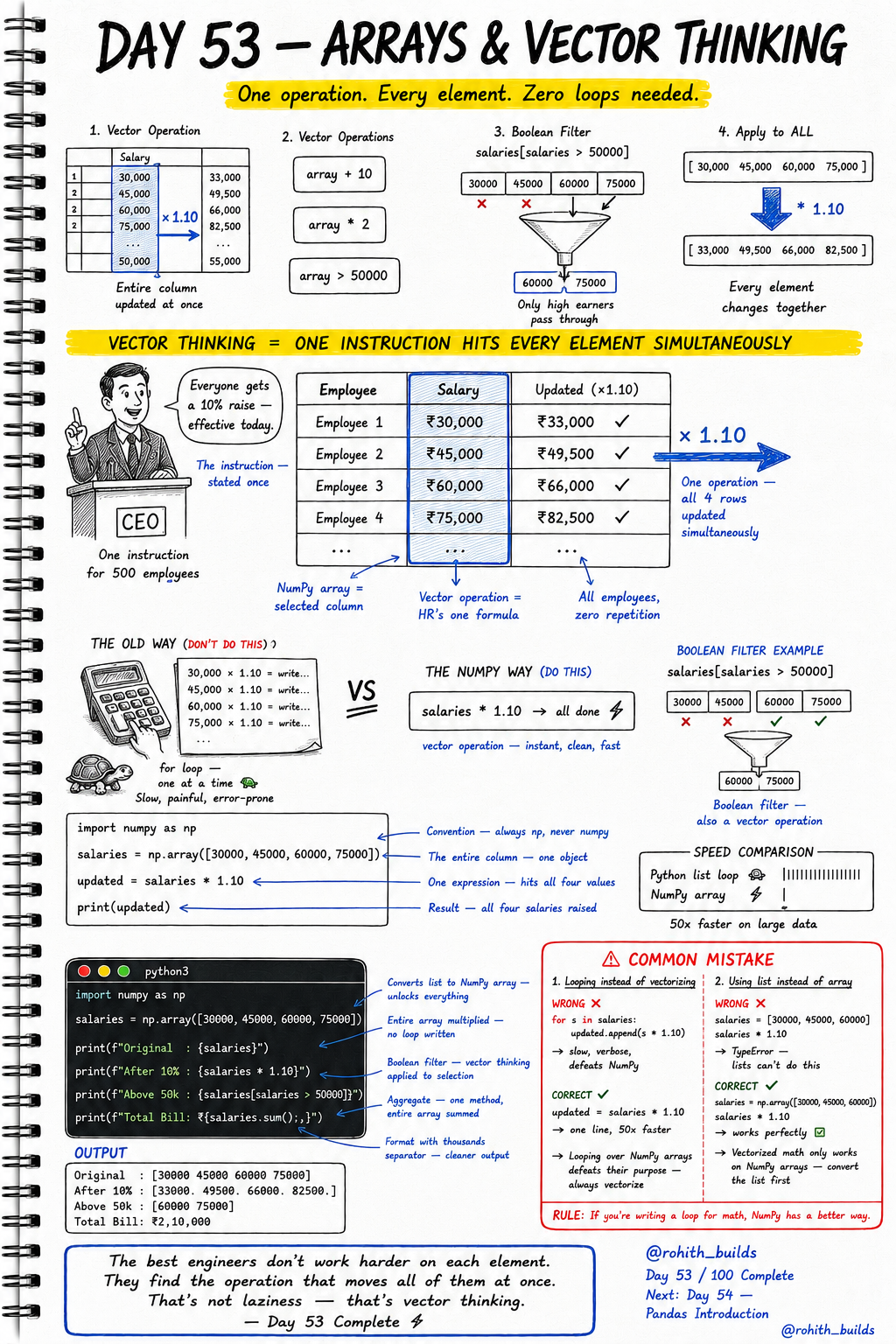
Day 53: Arrays & Vector Thinking — One Command, Every Element!
What Is Vector Thinking?
A CEO stands up and says "Everyone gets a 10% raise — effective today." One instruction. 500 employees. All salaries updated simultaneously. Nobody calculated each salary one by one. That's vector thinking — one operation hits every element at the same time. NumPy lets your code think exactly like that CEO. One line. Every value. Done!
The Old Way vs The NumPy Way
import numpy as np

salaries = np.array([30000, 45000, 60000, 75000])

# THE OLD WAY — slow, painful, error-prone
# for s in salaries:
#     updated.append(s * 1.10)   -- one at a time!

# THE NUMPY WAY — instant, clean, fast
updated = salaries * 1.10
print(f"Original  : {salaries}")
print(f"After 10% : {updated}")
Output: Original [30000 45000 60000 75000], After 10% [33000 49500 66000 82500]. One expression. Four values updated simultaneously. No loop. No repetition. 50x faster than a Python list loop on large data!
Boolean Filtering — Vector Thinking Applied
salaries = np.array([30000, 45000, 60000, 75000])

above_50k = salaries[salaries > 50000]
print(f"Above 50k : {above_50k}")
print(f"Total Bill: Rs.{salaries.sum():,}")
Output: Above 50k [60000 75000], Total Bill Rs.2,10,000. salaries > 50000 checks every element simultaneously and creates a filter. salaries[filter] returns only matching values. sum() adds them all in one call. No loops anywhere. That's the power!
All Vector Operations Together
import numpy as np

scores = np.array([45, 87, 92, 38, 76, 55, 91, 63])

print(f"Average  : {scores.mean():.1f}")
print(f"Highest  : {scores.max()}")
print(f"Lowest   : {scores.min()}")
print(f"Passing  : {scores[scores >= 50]}")
print(f"Failing  : {scores[scores < 50]}")
print(f"Doubled  : {scores * 2}")
Every operation hits all 8 scores at once. mean(), max(), min() — instant aggregates. Boolean filter finds passing and failing in one expression each. Doubling all scores — one multiplication, all values change together. This is how data science processes millions of rows in seconds!
Real World Connection
When Zomato gives 20% discount to all orders above 500 rupees — that's a boolean filter + vector operation on millions of orders. When a bank applies interest to every account — vector multiply on the entire accounts array. When Netflix calculates average rating for every show — mean() on millions of ratings simultaneously. When Instagram compresses every uploaded photo — pixel array operations on the entire image at once. Vector thinking is at the core of every data-heavy system!
Common Mistakes
Mistake 1 — Looping over NumPy arrays.
for s in salaries:
    updated.append(s * 1.10)   # WRONG — defeats the purpose of NumPy!

updated = salaries * 1.10      # CORRECT — one line, 50x faster!
Mistake 2 — Using a Python list instead of NumPy array.
salaries = [30000, 45000, 60000]
salaries * 1.10                         # WRONG — TypeError, lists can't do this!

salaries = np.array([30000, 45000, 60000])
salaries * 1.10                         # CORRECT — works perfectly!
Mini Challenge
Mini Challenge
Create a NumPy array of 8 product prices. Apply a 15% discount to all prices in one line. Filter only products that cost more than 500 rupees after discount. Find the average, highest and lowest discounted price. Print everything cleanly. You just built the pricing engine that every e-commerce platform uses on millions of products!
Quick Quiz
Q: Why is salaries * 1.10 better than a for loop? A: It applies to every element simultaneously — no loop needed, 50x faster on large data!
Q: How do you filter a NumPy array for values above 50000? A: array[array > 50000] — boolean filter, pure vector thinking!
Q: Can you do salaries * 1.10 on a regular Python list? A: No! Convert to NumPy array first with np.array() — then vector operations work!
Key Takeaways
Key Takeaways
- Vector thinking means one operation hits every element simultaneously — no loops!
- np.array() converts a list to a NumPy array and unlocks vector operations.
- array * 1.10 multiplies every element at once. array[array > 50000] filters instantly.
- Never loop over NumPy arrays for math — always vectorize!
- NumPy arrays are 50x faster than Python list loops on large data!
Continue Learning with Rohi
You've used your 3 free Rohi questions. Create a free account to continue learning.