Expense Tracker — Phase 2 Complete! 🏆💰🗄️
49 days. Real data. Your first backend product. Build a working expense tracker that remembers every rupee — permanently!
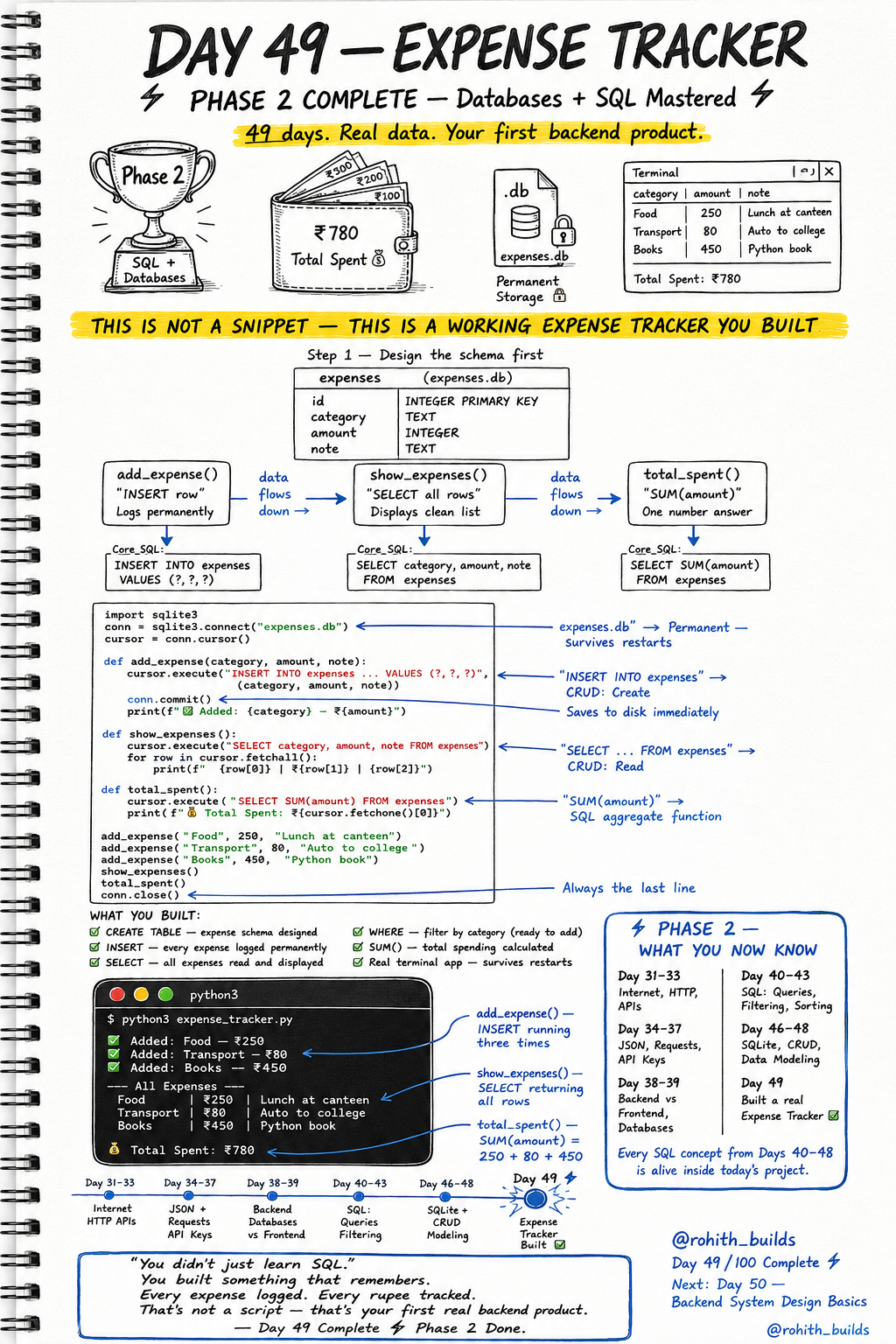
Day 49: Expense Tracker — Your First Real Backend Product!
Phase 2 Complete — What You Now Know
Days 31 to 33 — Internet, HTTP, APIs. Days 34 to 37 — JSON, Requests, API Keys. Days 38 to 39 — Backend vs Frontend, Databases. Days 40 to 43 — SQL Queries, Filtering, Sorting. Days 46 to 48 — SQLite, CRUD, Data Modeling. Today every single concept comes alive in one real working product. Not a script. A backend product that remembers!
Step 1 — Design the Schema First
Always draw before you code. The expenses table needs id (unique identifier), category (what type of expense), amount (how much in rupees), and note (what it was for). One table. One responsibility. Clean design before first line of code!
The Complete Expense Tracker
import sqlite3

conn = sqlite3.connect("expenses.db")
cursor = conn.cursor()

cursor.execute("""CREATE TABLE IF NOT EXISTS expenses (
    id       INTEGER PRIMARY KEY,
    category TEXT,
    amount   INTEGER,
    note     TEXT
)""")
conn.commit()

def add_expense(category, amount, note):
    cursor.execute(
        "INSERT INTO expenses VALUES (NULL, ?, ?, ?)",
        (category, amount, note)
    )
    conn.commit()
    print(f"Added: {category} - Rs.{amount}")

def show_expenses():
    cursor.execute("SELECT category, amount, note FROM expenses")
    print("--- All Expenses ---")
    for row in cursor.fetchall():
        print(f"{row[0]} | Rs.{row[1]} | {row[2]}")

def total_spent():
    cursor.execute("SELECT SUM(amount) FROM expenses")
    print(f"Total Spent: Rs.{cursor.fetchone()[0]}")

add_expense("Food", 250, "Lunch at canteen")
add_expense("Transport", 80, "Auto to college")
add_expense("Books", 450, "Python book")

show_expenses()
total_spent()

conn.close()
Output: Added Food Rs.250, Added Transport Rs.80, Added Books Rs.450. All Expenses listed cleanly. Total Spent: Rs.780. Close the program, reopen it — every expense still there. That's permanent memory. That's a real product!
What Each Part Does
add_expense() runs INSERT — CRUD Create. Saves every expense permanently to disk the moment you call it. show_expenses() runs SELECT — CRUD Read. Displays every logged expense in a clean format. total_spent() runs SELECT SUM() — SQL aggregate function. Adds up all amounts and returns one single total number. Three functions. Complete app!
Real World Connection
This is literally how every finance app works. Splitwise logs expenses (INSERT), shows your history (SELECT), calculates what you owe (SUM). Google Pay logs every transaction (INSERT), shows your statement (SELECT), shows monthly spend (SUM). Your college's fee management system — INSERT when you pay, SELECT when the office checks, SUM for total collected. You just built the core of all of them!
Level Up — Add Filtering
def expenses_by_category(category):
    cursor.execute(
        "SELECT amount, note FROM expenses WHERE category = ?",
        (category,)
    )
    print(f"--- {category} Expenses ---")
    for row in cursor.fetchall():
        print(f"Rs.{row[0]} | {row[1]}")

expenses_by_category("Food")
Now you can filter by category — show only Food or only Transport expenses. The ? placeholder safely inserts the value without SQL injection risk. This is how professional developers write safe SQL in Python!
Mini Challenge
Mini Challenge
Add a delete_expense(id) function that removes an expense by its id. Add a biggest_expense() function that finds the single most expensive item using ORDER BY amount DESC LIMIT 1. Run the full app with all five functions. You now have a complete CRUD expense tracker — the same core that powers every finance app in the world!
Quick Quiz
Q: What SQL function adds up all values in a column? A: SUM() — SELECT SUM(amount) FROM expenses!
Q: Why use ? placeholders instead of putting values directly in SQL strings? A: Safety — prevents SQL injection attacks. Always use ? for user-provided values!
Q: What CRUD operation does show_expenses() perform? A: Read — it runs SELECT to fetch and display all stored expenses!
Key Takeaways
Key Takeaways
- A real product combines schema design, CRUD operations and SQL queries together.
- SUM() is a SQL aggregate function — adds all values in a column instantly.
- Always use ? placeholders for safe SQL in Python — never string-format values in.
- Design schema first, write functions second, test third — always in this order.
- You built something that remembers. That's not a script — that's your first real backend product!
Continue Learning with Rohi
You've used your 3 free Rohi questions. Create a free account to continue learning.