Data Modeling 📐🔗📊
Draw the boxes first. The code writes itself after. A data model is the skeleton — everything else is built on top of it!
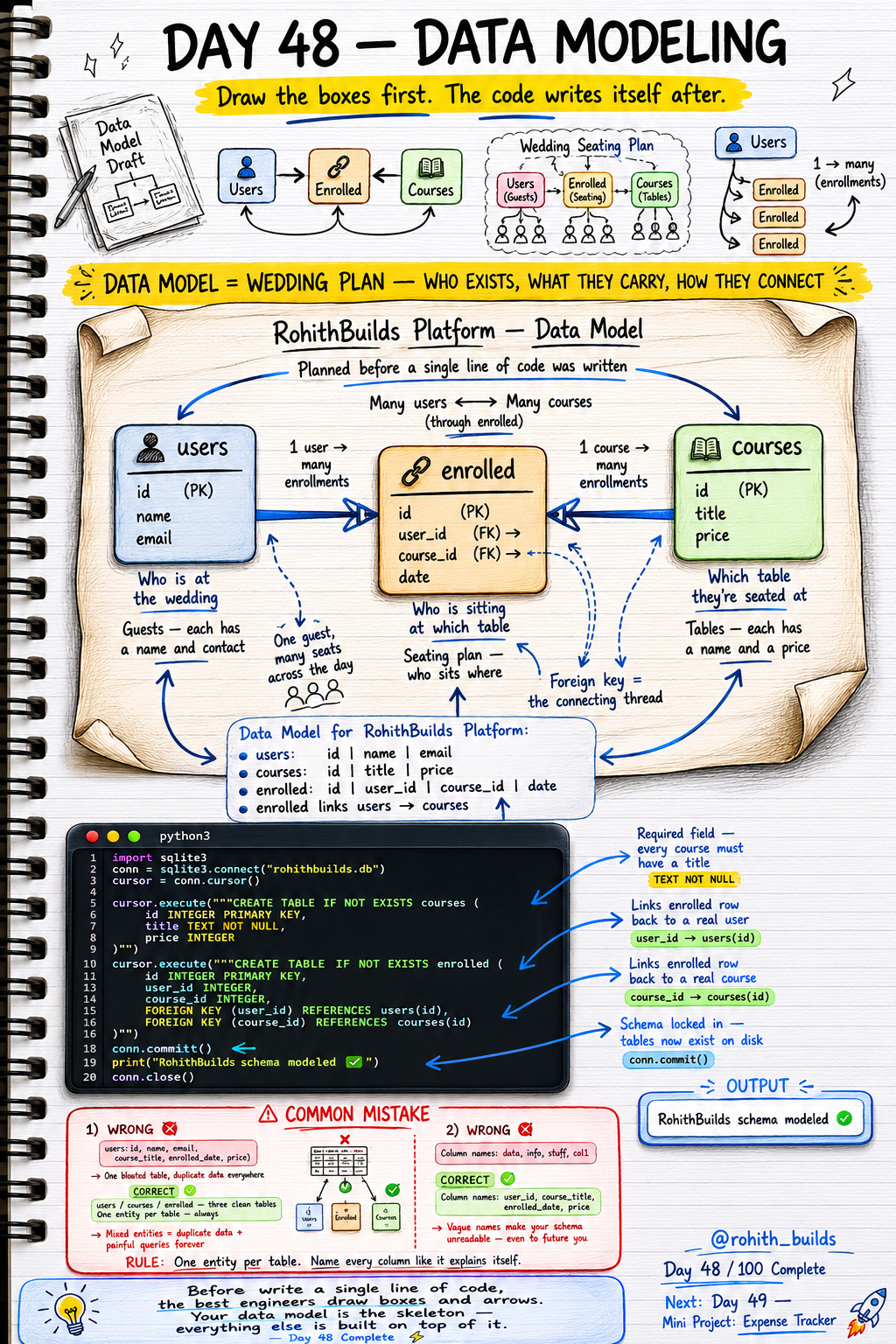
Day 48: Data Modeling — Draw Boxes Before Writing Code!
What Is Data Modeling?
Imagine planning a wedding. Before the big day you draw a seating plan — who exists (guests), what they carry (names, contacts), and how they connect (who sits at which table). Data modeling is exactly that for your database. Draw the boxes and arrows first. Decide who exists, what they carry, how they connect. Then the code writes itself. The best engineers always draw before they type!
The RohithBuilds Platform Data Model
Three clean tables. Three responsibilities. users stores who is learning — id, name, email. courses stores what can be learned — id, title, price. enrolled is the seating plan — id, user_id, course_id, date. One user can enroll in many courses. One course can have many users. The enrolled table connects them through foreign keys!
Building the Schema in Code
import sqlite3

conn = sqlite3.connect("rohithbuilds.db")
cursor = conn.cursor()

cursor.execute("""CREATE TABLE IF NOT EXISTS courses (
    id    INTEGER PRIMARY KEY,
    title TEXT NOT NULL,
    price INTEGER
)""")

cursor.execute("""CREATE TABLE IF NOT EXISTS enrolled (
    id        INTEGER PRIMARY KEY,
    user_id   INTEGER,
    course_id INTEGER,
    FOREIGN KEY (user_id) REFERENCES users(id),
    FOREIGN KEY (course_id) REFERENCES courses(id)
)""")

conn.commit()
print("RohithBuilds schema modeled!")
conn.close()
TEXT NOT NULL means every course must have a title — no empty courses allowed. Two FOREIGN KEYS link enrolled back to both users and courses. The model drawn on paper became clean working code in minutes!
The Wedding Seating Analogy
users = guests — each has a name and contact. courses = tables — each has a name and a price. enrolled = the seating plan — who sits where. One guest can sit at many tables across the day. One table can seat many guests. The enrolled table is the connecting thread that makes many-to-many relationships possible. Without it you'd have chaos — exactly like a wedding with no seating plan!
Real World Connection
Udemy's data model: users, courses, enrollments — exactly this. Netflix: users, shows, watchlist linking them. Spotify: users, songs, playlists as the connector. Amazon: users, products, orders linking them. Every platform you've ever paid for or signed up to was modeled exactly like this before a single line of code was written. Now you design the same way!
Common Mistakes
Mistake 1 — One giant bloated table for everything.
-- WRONG — mixed entities = duplicate data forever!
users(id, name, email, course_title, enrolled_date, price)

-- CORRECT — three clean tables!
users / courses / enrolled
Mistake 2 — Vague column names.
-- WRONG — unreadable even to future you!
data, info, stuff, col1

-- CORRECT — names that explain themselves!
user_id, course_title, enrolled_date, price
Mini Challenge
Mini Challenge
On paper first — draw three boxes for a library system: books (id, title, author), members (id, name, email), and borrowed (id, member_id, book_id, return_date). Draw the arrows between them. Then write the CREATE TABLE code with proper PRIMARY KEYS and FOREIGN KEYS. You just designed a real library management system from scratch — exactly how professional database architects work!
Quick Quiz
Q: What is a data model? A: A plan showing which tables exist, what columns they have and how they connect — drawn before writing any code!
Q: Why do we need an enrolled table between users and courses? A: It handles many-to-many relationships — one user can enroll in many courses and one course can have many users!
Q: What does TEXT NOT NULL do on a column? A: Makes that field required — rows cannot be inserted without a value in that column!
Key Takeaways
Key Takeaways
- Always draw your data model on paper before writing a single line of code.
- One entity per table — users, courses and enrollments are three separate concerns.
- A junction table like enrolled handles many-to-many relationships cleanly.
- Name every column like it explains itself — vague names cost hours later.
- Your data model is the skeleton — everything else is built on top of it!
Continue Learning with Rohi
You've used your 3 free Rohi questions. Create a free account to continue learning.