Scikit-Learn 🔧🤖📦
Master the one universal workflow that powers every scikit-learn model — Import, Instantiate, fit(), predict(). One pattern. Every algorithm. Infinite models.
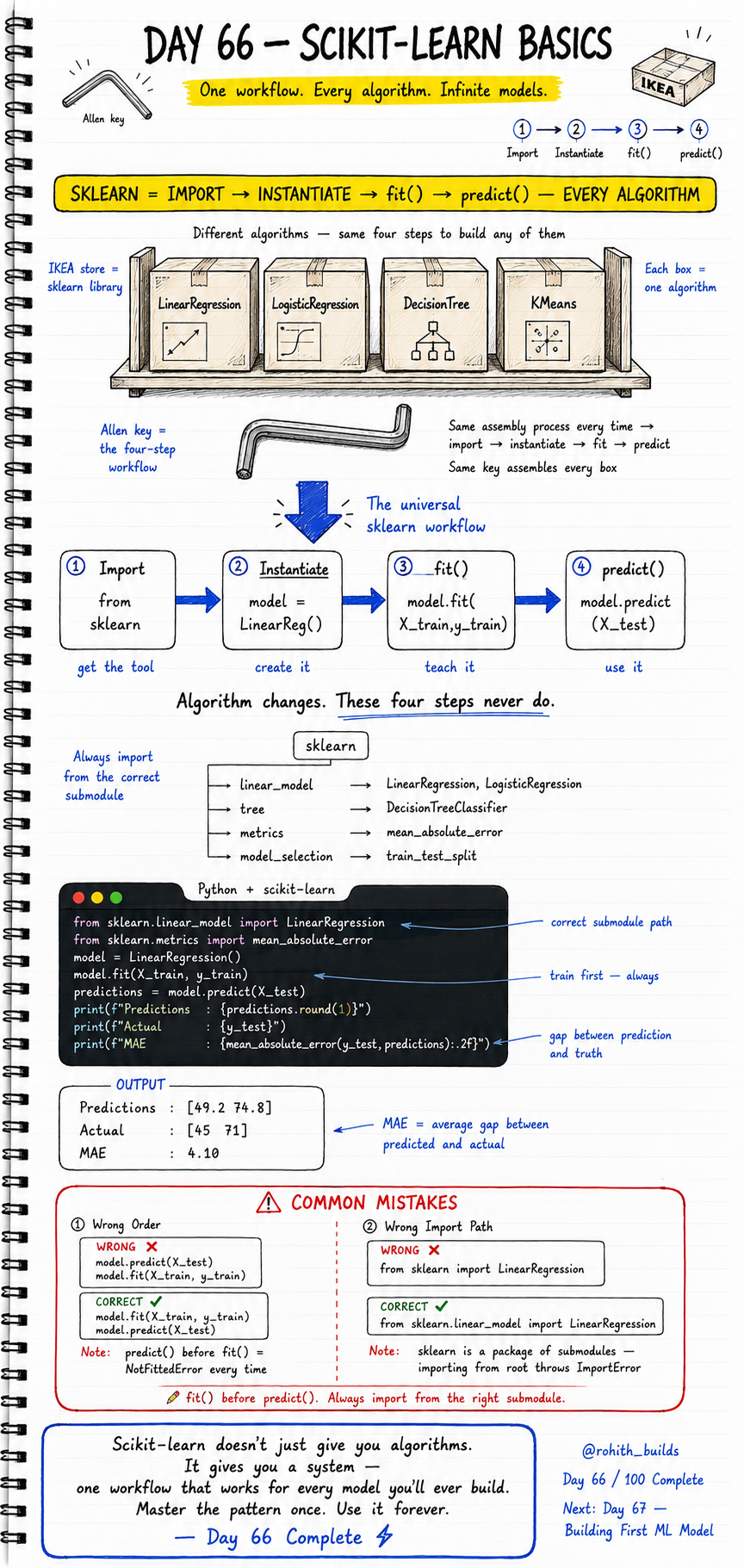
Day 66: Scikit-Learn Basics
Why Should I Care?
Imagine if every app you ever built used the exact same four buttons — no matter what it did. That is scikit-learn. Whether you are predicting house prices, detecting spam, or clustering customers, the workflow never changes. Import the tool. Create it. Teach it. Use it. Master this four-step pattern today and you can build any machine learning model that exists. This is the single most important workflow in all of Python machine learning.
Core Concept
Think of scikit-learn like an IKEA store. The store is the sklearn library. Each box on the shelf is a different algorithm — LinearRegression, LogisticRegression, DecisionTree, KMeans. They all look different inside. But every single box is assembled the same way. You use the same Allen key every time — and that Allen key is the four-step workflow: Import, Instantiate, fit(), predict(). The algorithm changes. These four steps never do.
How It Works
Step 1 — Import: Get the algorithm from the correct sklearn submodule. Step 2 — Instantiate: Create the model object, like opening the IKEA box. Step 3 — fit(): Train the model on your data. This is where it learns. Step 4 — predict(): Give it new data and get answers. Always train before you predict. Always import from the right submodule path — sklearn is a package of submodules, not one flat library.
from sklearn.linear_model import LinearRegression
from sklearn.metrics import mean_absolute_error
from sklearn.model_selection import train_test_split
import numpy as np

# Sample data — hours studied vs score
hours  = np.array([[1],[2],[3],[4],[5],[6],[7],[8]])
scores = np.array([30, 40, 45, 55, 65, 70, 75, 85])

# Split data into training and testing sets
X_train, X_test, y_train, y_test = train_test_split(
    hours, scores, test_size=0.2, random_state=42
)

# Step 1+2: Import and Instantiate
model = LinearRegression()

# Step 3: fit() — teach the model
model.fit(X_train, y_train)

# Step 4: predict() — use the model
predictions = model.predict(X_test)

print(f"Predictions : {predictions.round(1)}")
print(f"Actual      : {y_test}")
print(f"MAE         : {mean_absolute_error(y_test, predictions):.2f}")
Real World Connection
Think about how Amazon recommends products. Their engineers Import a recommendation algorithm, Instantiate it, fit() it on millions of past purchases, then predict() what you will buy next. Same four steps. Swiggy uses the exact same workflow to predict your delivery time — fit on thousands of past deliveries, predict for your current order. Netflix fits on your watch history and predicts which show you will binge next. Every ML product in every company you know runs on this exact four-step pattern.
Examples
# The same four-step workflow works for ANY algorithm

# Example 1 — LinearRegression (predicts a number)
from sklearn.linear_model import LinearRegression
model = LinearRegression()
model.fit(X_train, y_train)
predictions = model.predict(X_test)
print(f"Predictions : {predictions.round(1)}")
print(f"Actual      : {y_test}")

# Example 2 — LogisticRegression (predicts a category)
from sklearn.linear_model import LogisticRegression
clf = LogisticRegression()
clf.fit(X_train, y_train_labels)
labels = clf.predict(X_test)

# Example 3 — DecisionTreeClassifier (same four steps again)
from sklearn.tree import DecisionTreeClassifier
tree = DecisionTreeClassifier()
tree.fit(X_train, y_train_labels)
result = tree.predict(X_test)

# Algorithm changes. Import, Instantiate, fit(), predict() never do.
Common Mistakes
Two mistakes crash beginners every single time. First — calling predict() before fit(). The model has not learned anything yet, so it throws a NotFittedError. Second — importing from the wrong path. Sklearn is a package of submodules. You cannot import directly from the root — you must go through the correct submodule.
# WRONG - predict() before fit()
model.predict(X_test)
model.fit(X_train, y_train)
# NotFittedError — the model has not learned yet
# predict() before fit() fails every single time

# CORRECT - Always fit() first, then predict()
model.fit(X_train, y_train)
model.predict(X_test)
# Train first. Always. No exceptions.

# ------------------------------------------

# WRONG - Importing from the sklearn root
from sklearn import LinearRegression
# ImportError — LinearRegression is not at the root level

# CORRECT - Always import from the right submodule
from sklearn.linear_model import LinearRegression
from sklearn.tree import DecisionTreeClassifier
from sklearn.metrics import mean_absolute_error
from sklearn.model_selection import train_test_split
# sklearn is a package of submodules — always use the full path
Mini Challenge
Mini Challenge
You are building a delivery time predictor for a Zomato-style app. Create a dataset where distance in km is the feature and delivery time in minutes is the target. Use at least 8 data points. Follow all four steps — Import LinearRegression, Instantiate it, fit() it on your training data, then predict() the delivery time for 3 km and 7 km. Print predictions and calculate the MAE. Bonus: Swap LinearRegression for DecisionTreeClassifier using the exact same four steps.
Quick Quiz
Q: What are the four steps of the universal scikit-learn workflow in order?
A: Import the algorithm, Instantiate the model, fit() it on training data, predict() on new data. Always in this order.
Q: What error do you get if you call predict() before fit()?
A: NotFittedError — the model has not learned anything yet. Always call fit() first.
Q: What is the correct way to import LinearRegression from scikit-learn?
A: from sklearn.linear_model import LinearRegression — sklearn has submodules and you must always import from the correct submodule path.
Bonus Knowledge
The four sklearn submodules you will use most often are: sklearn.linear_model for LinearRegression and LogisticRegression, sklearn.tree for DecisionTreeClassifier, sklearn.metrics for measuring accuracy with mean_absolute_error and accuracy_score, and sklearn.model_selection for train_test_split. Memorise these four paths and you can find and use almost any algorithm in the library. Also — MAE stands for Mean Absolute Error. It tells you the average gap between what the model predicted and the actual value. A MAE of 4.10 means your predictions are off by about 4 units on average. Lower is always better.
Key Takeaways
Key Takeaways
- Scikit-learn gives you one universal workflow — Import, Instantiate, fit(), predict() — for every algorithm.
- The algorithm changes. The four steps never do. Master the pattern once, use it forever.
- fit() teaches the model using training data. predict() uses what it learned on new data.
- Always call fit() before predict() — predict() before fit() throws a NotFittedError every time.
- Always import from the correct submodule path — from sklearn.linear_model, not from sklearn directly.
- Key submodules: linear_model, tree, metrics, model_selection — memorise these four paths.
- MAE measures the average gap between predictions and actual values — lower means a better model.
- Every ML product at Amazon, Netflix, Swiggy, and Zomato runs on this exact same four-step workflow.
Continue Learning with Rohi
You've used your 3 free Rohi questions. Create a free account to continue learning.