DataFrames 📊🐼🔍
Master Pandas DataFrames — filter rows, select columns, peek at data, and calculate stats. Ask precise questions, get exact answers every time.
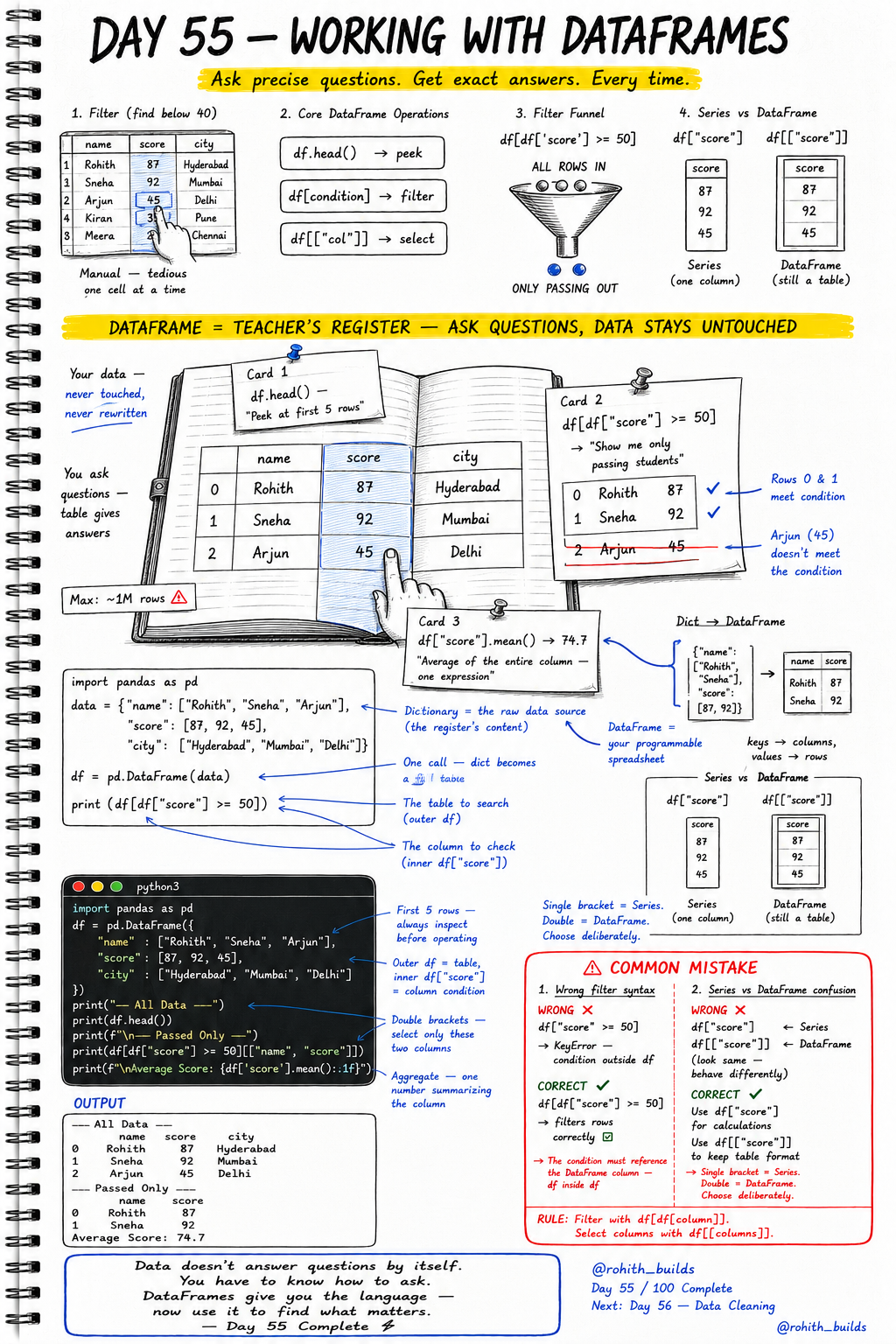
Day 55: Working with DataFrames
Why Should I Care?
Imagine your school has 1000 students. You want to find everyone who scored above 50. Without DataFrames, you check each row manually — painful and slow. With a DataFrame, you write one line and get the answer instantly. This is exactly how Zomato finds top-rated restaurants, how Amazon filters products by price, and how YouTube ranks your recommendations. DataFrames are the tool that makes all of it possible.
Core Concept
A DataFrame is like a teacher''s register — a table with rows and columns. Your data sits inside it safe and untouched. You just ask questions and the table gives answers. You can peek at the first few rows, filter only passing students, select specific columns, or calculate the average score — all with one line each. The original data never changes unless you tell it to.
How It Works
Step 1 — Import Pandas as pd. Step 2 — Create a dictionary with your data. Step 3 — Convert it into a DataFrame using pd.DataFrame(). Now you have a programmable spreadsheet. Keys of the dictionary become columns. Values become rows. From here, use df.head() to peek, df[condition] to filter, df[["col"]] to select columns, and df["col"].mean() to calculate stats.
import pandas as pd

data = {
    "name":  ["Rohith", "Sneha", "Arjun", "Kiran", "Meera"],
    "score": [87, 92, 45, 31, 22],
    "city":  ["Hyderabad", "Mumbai", "Delhi", "Pune", "Chennai"]
}

df = pd.DataFrame(data)

print(df.head())              # Peek at first 5 rows
print(df[df["score"] >= 50]) # Filter passing students
print(df["score"].mean())     # Average score of all students
Real World Connection
Think about Swiggy. Every order, every restaurant, every delivery partner is stored in a giant DataFrame-like table. When you search for "pizza under 200 rupees", Swiggy runs a filter — df[df["price"] <= 200] — and shows you only those results. When PhonePe shows your last 5 transactions, that is df.head(5). When Netflix picks your top recommendations, it calculates scores like df["rating"].mean(). DataFrames power every app you use every single day.
Examples
import pandas as pd

df = pd.DataFrame({
    "name":  ["Rohith", "Sneha", "Arjun"],
    "score": [87, 92, 45],
    "city":  ["Hyderabad", "Mumbai", "Delhi"]
})

# Peek at the data
print("---- All Data ----")
print(df.head())

# Filter only passed students (score >= 50)
print("\n---- Passed Only ----")
print(df[df["score"] >= 50][["name", "score"]])

# Calculate average score
print(f"\nAverage Score: {df['score'].mean():.1f}")

# Select only name and city columns (keep table format)
print(df[["name", "city"]])
Common Mistakes
Two mistakes trip up almost every beginner. First — wrong filter syntax where the condition lives outside the DataFrame. Second — confusing single brackets (gives a Series) with double brackets (gives a DataFrame). Both look similar but behave very differently.
# WRONG - Condition written outside the DataFrame
df["score"] >= 50
# KeyError — the condition must live inside df[...]

# CORRECT - Condition inside the outer df
df[df["score"] >= 50]
# Filters rows correctly — always wrap condition inside df[...]

# ------------------------------------------

# WRONG - Single bracket when you need a DataFrame
df["score"]
# This gives a Series — one column, no table format

# CORRECT - Double bracket to keep table format
df[["score"]]
# This gives a DataFrame — still looks like a table
# Rule: Single bracket = Series. Double bracket = DataFrame. Choose deliberately.
Mini Challenge
Mini Challenge
You are building a cricket team selector. Create a DataFrame with 5 players — each with a name, runs scored, and city. Use df.head() to peek at the data. Filter only players who scored more than 60 runs. Print just their name and runs columns. Finally, calculate and print the average runs scored by the entire team.
Quick Quiz
Q: What does df.head() do?
A: It shows the first 5 rows of the DataFrame — perfect for peeking at your data before doing anything else.
Q: What is the correct way to filter rows where score is above 50?
A: df[df["score"] > 50] — the condition must be inside the outer df[ ] brackets.
Q: What is the difference between df["score"] and df[["score"]]?
A: Single bracket gives a Series (just values). Double bracket gives a DataFrame (still a table). Choose based on what you need next.
Bonus Knowledge
DataFrames can hold up to 1 million rows and still respond in milliseconds. That is why companies use them for real data. You can also chain operations together — filter rows AND select columns in one line like df[df["score"] >= 50][["name", "score"]]. And remember — DataFrames never change your original data when you filter. You are just asking questions. The register stays clean. To actually save a filtered result, store it in a new variable like passed = df[df["score"] >= 50].
Key Takeaways
Key Takeaways
- A DataFrame is a programmable spreadsheet — rows, columns, and instant answers.
- Always import Pandas as pd — it is the universal convention.
- Use pd.DataFrame(dict) to create a DataFrame from a dictionary.
- df.head() peeks at the first 5 rows — always inspect before operating.
- Filter rows with df[df["column"] condition] — condition must be inside the outer df[ ].
- Single bracket df["col"] gives a Series. Double bracket df[["col"]] gives a DataFrame.
- Use df["col"].mean() to calculate the average of any column in one line.
- DataFrames never touch your original data when you filter — they just answer questions.
Continue Learning with Rohi
You've used your 3 free Rohi questions. Create a free account to continue learning.