NumPy ⚡🔢🚀
Learn how NumPy supercharges Python with lightning-fast arrays. Process entire datasets in one line — no loops, no pain.
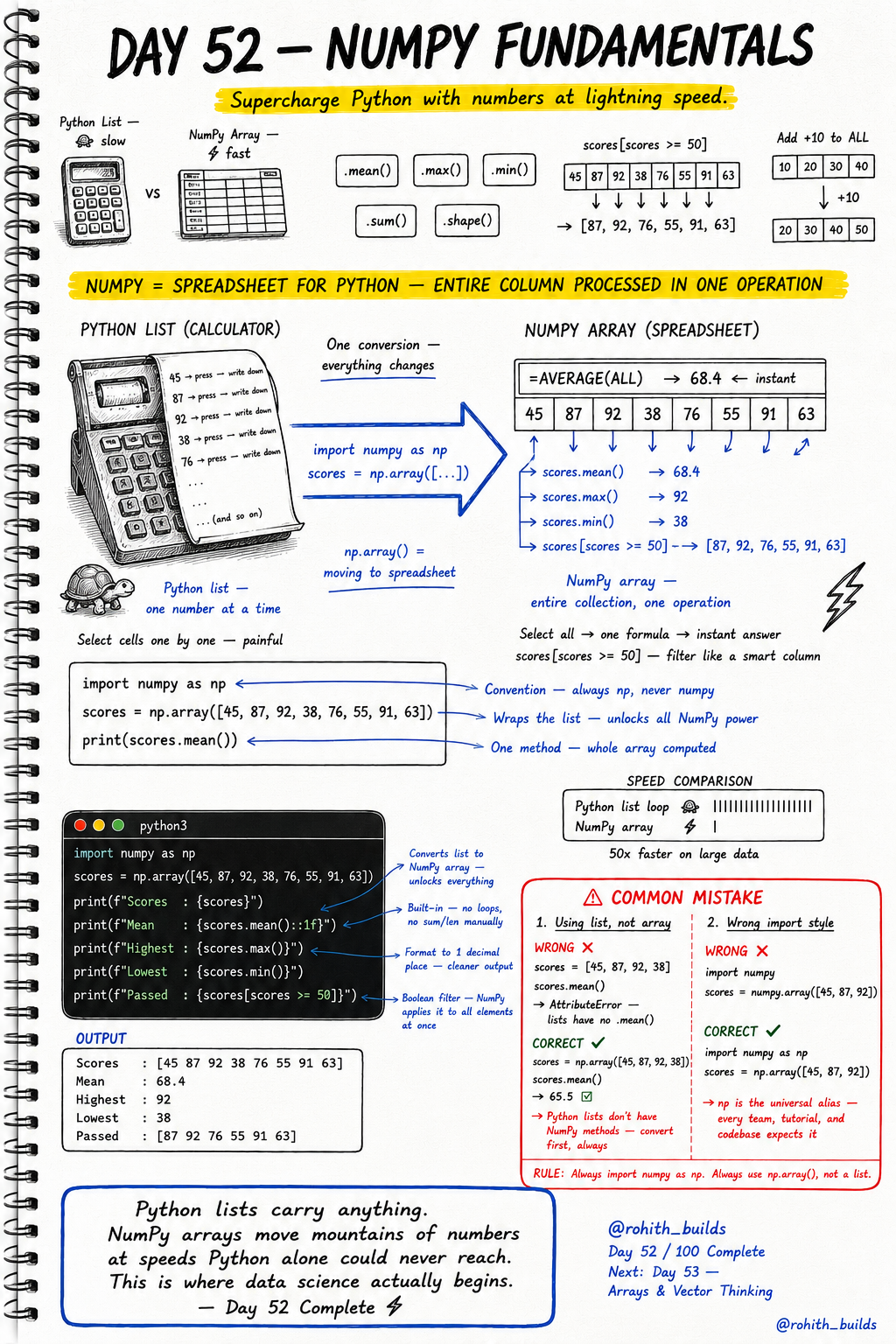
Day 52: NumPy Fundamentals
Why Should I Care?
Imagine you have 1 million student scores. With a normal Python list, you loop through every single one. Painful and slow. NumPy does it in ONE line — 50x faster. This is how data scientists work. This is where the real magic begins.
Core Concept
NumPy gives you a special container called an array. Think of a Python list as an old calculator — one button at a time. A NumPy array is like a spreadsheet — one formula, entire column done instantly. You import NumPy as np (everyone does this — it is the universal rule), wrap your list with np.array(), and boom — superpowers unlocked.
How It Works
Step 1 — Import NumPy. Step 2 — Convert your list into a NumPy array. Step 3 — Use built-in methods to get answers instantly. No loops. No manual counting. Just one method call and you are done.
import numpy as np

scores = np.array([45, 87, 92, 38, 76, 55, 91, 63])

print(scores.mean())   # Average of all scores
print(scores.max())    # Highest score
print(scores.min())    # Lowest score
print(scores.sum())    # Total of all scores
print(scores.shape)    # How many elements are there
Real World Connection
Think about PUBG — the game tracks every player's damage, kills, and survival time across millions of matches. They cannot loop through each player one by one. They use NumPy-style array operations to calculate leaderboards, average damage, and top performers in milliseconds. YouTube uses the same idea to rank millions of videos by views, watch time, and likes — all at once.
Examples
import numpy as np

scores = np.array([45, 87, 92, 38, 76, 55, 91, 63])

# Print formatted results
print(f"Scores   : {scores}")
print(f"Mean     : {scores.mean():.1f}")
print(f"Highest  : {scores.max()}")
print(f"Lowest   : {scores.min()}")

# Boolean filter — only scores 50 and above
print(f"Passed   : {scores[scores >= 50]}")

# Add 10 bonus marks to everyone at once
scores = scores + 10
print(f"After Bonus : {scores}")
Common Mistakes
Two mistakes almost every beginner makes. First — calling NumPy methods on a plain list. Second — importing NumPy with the wrong name. Both will crash your code. See below.
# WRONG - Using a plain list with NumPy methods
scores = [45, 87, 92, 38]
scores.mean()
# AttributeError: list object has no attribute mean
# Python lists do not have NumPy methods. Convert first!

# CORRECT - Convert to NumPy array first
scores = np.array([45, 87, 92, 38])
scores.mean()
# Works perfectly — 65.5

# ------------------------------------------

# WRONG - Bad import style
import numpy
scores = numpy.array([45, 87, 92])
# This works but nobody does this. It breaks team code.

# CORRECT - Always use the alias np
import numpy as np
scores = np.array([45, 87, 92])
# np is the universal alias — every tutorial, team, and codebase expects it
Mini Challenge
Mini Challenge
You are building a cricket score tracker. Create a NumPy array with these scores: 34, 78, 55, 90, 12, 67, 88, 45. Print the average score, the highest score, the lowest score, and filter out only the scores above 60. Bonus: Add 5 extra runs to every player and print the updated array.
Quick Quiz
Q: What is the correct way to import NumPy?
A: import numpy as np — always use the alias np, never the full name.
Q: How do you find the average of a NumPy array called data?
A: data.mean() — one method call, instant answer, no loop needed.
Q: What does scores[scores >= 50] do?
A: It filters the array and returns only the values that are 50 or above — called boolean filtering.
Bonus Knowledge
NumPy arrays are not just fast — they are the foundation of almost every major Python data tool. Pandas (for tables), Matplotlib (for charts), Scikit-learn (for machine learning) — all of them run on NumPy under the hood. When you learn NumPy today, you are not just learning one tool. You are unlocking the entire data science ecosystem. Also — when you do scores + 10, NumPy adds 10 to every single element at once. This is called vectorization and it is the secret behind its speed.
Key Takeaways
Key Takeaways
- NumPy arrays are 50x faster than Python lists for number operations.
- Always import NumPy as np — it is the universal convention everyone follows.
- Use np.array() to convert a Python list into a powerful NumPy array.
- Key methods: .mean(), .max(), .min(), .sum(), .shape() — no loops needed.
- Boolean filtering like scores[scores >= 50] selects elements in one line.
- Math on arrays is instant — scores + 10 adds 10 to every element at once.
- NumPy is the foundation of Pandas, Matplotlib, and all of data science.
Continue Learning with Rohi
You've used your 3 free Rohi questions. Create a free account to continue learning.