Databases 🗄️💾🔍
Give your program permanent memory. Variables die when code stops. Databases live forever!
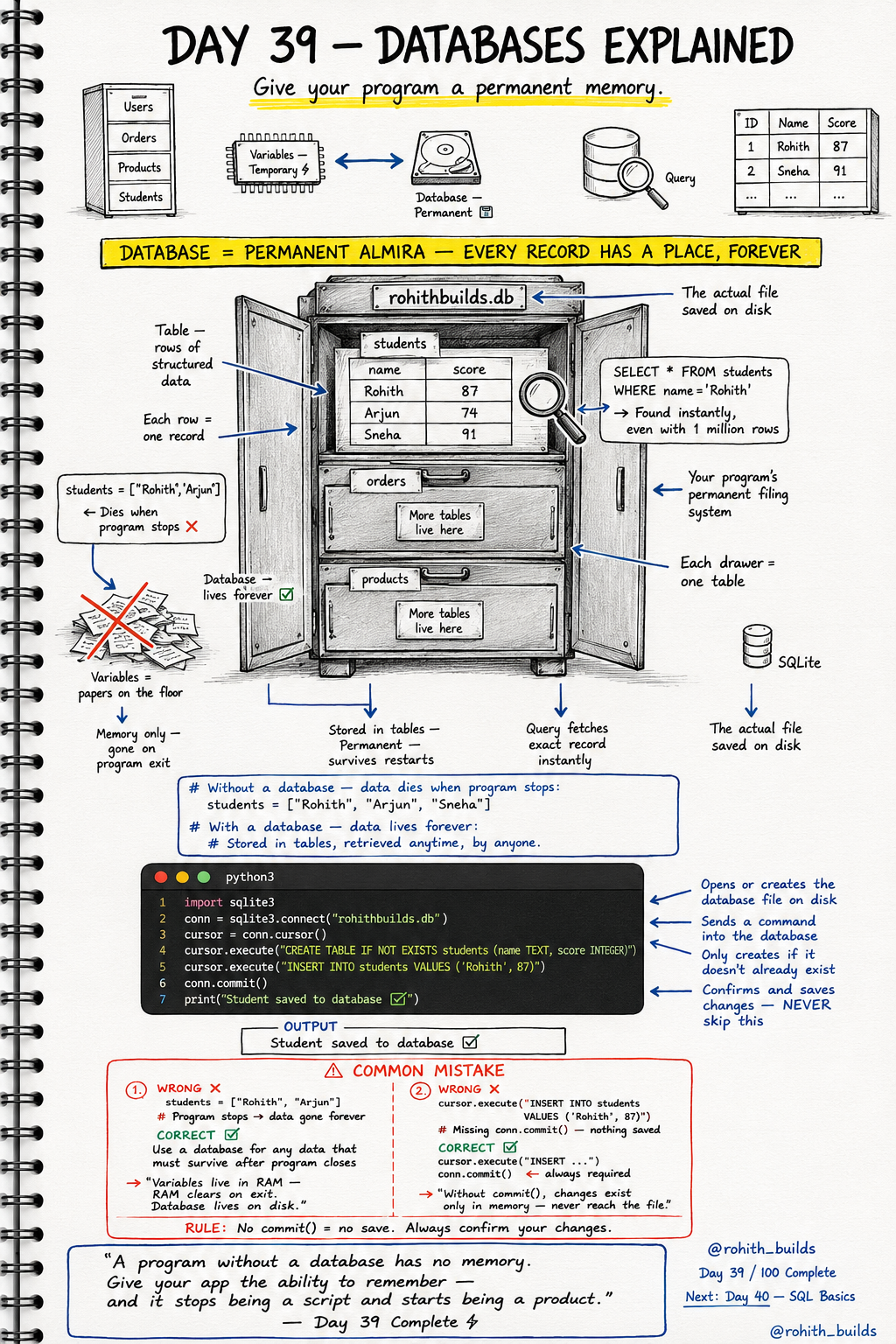
Day 39: Databases — Give Your App a Memory!
The Problem Without Databases
You build an app. Users sign up. You store their names in a list. Program stops. Everything gone. Next time they visit — app has no idea who they are. Variables live in RAM — RAM clears on exit. A database lives on disk — it survives forever. Without a database your app is just a script. With one, it becomes a real product!
Database = Permanent Almira
Imagine a filing cabinet. Each drawer is a table. Each folder is a row. Every student, order, product gets its own permanent spot. Close the cabinet, come back tomorrow — everything exactly where you left it. That's a database. SQLite is the simplest one and it comes free with Python!
Creating Your First Database
import sqlite3

conn = sqlite3.connect("rohithbuilds.db")
cursor = conn.cursor()

cursor.execute("CREATE TABLE IF NOT EXISTS students (name TEXT, score INTEGER)")
cursor.execute("INSERT INTO students VALUES ('Rohith', 87)")

conn.commit()
print("Student saved to database!")
sqlite3.connect() opens or creates the database file on disk. cursor sends commands into it. CREATE TABLE creates a drawer with columns. INSERT INTO adds a row. conn.commit() confirms and saves — never skip this or nothing gets stored!
Reading Data Back
import sqlite3

conn = sqlite3.connect("rohithbuilds.db")
cursor = conn.cursor()

cursor.execute("SELECT * FROM students")
rows = cursor.fetchall()

for row in rows:
    print(row)
Output: ('Rohith', 87). SELECT * FROM students fetches every row. fetchall() gives you a list of all rows. Loop through and print each one. Close the program, run again tomorrow — your data is still there!
Real World Connection
Instagram stores every user, post, like and comment in a database. Zomato stores every restaurant, menu item and order in a database. Your school stores every student and grade in a database. When you sign up for anything, your details go into a database. When you log in, the app queries the database to verify you. Databases are the memory of the internet!
Common Mistakes
Mistake 1 — Using a list instead of a database for permanent data.
students = ["Rohith", "Arjun"]   # WRONG — gone when program stops!

cursor.execute("INSERT INTO students VALUES ('Rohith', 87)")
conn.commit()                     # CORRECT — lives on disk forever!
Mistake 2 — Forgetting conn.commit().
cursor.execute("INSERT INTO students VALUES ('Rohith', 87)")
# WRONG — missing commit, nothing actually saved!

cursor.execute("INSERT INTO students VALUES ('Rohith', 87)")
conn.commit()   # CORRECT — now it's permanently saved!
Mini Challenge
Mini Challenge
Create a database called myschool.db. Create a students table with name and score columns. Insert 3 students with different scores. Then fetch and print all of them. Close and rerun the program — your students are still there! You just built the same data storage system every school app uses!
Quick Quiz
Q: Why use a database instead of a Python list? A: Lists die when the program stops. Databases live on disk forever!
Q: What does conn.commit() do? A: Confirms and permanently saves your changes — without it nothing is stored!
Q: What's a table in a database? A: A structured collection of rows and columns — like a spreadsheet in your filing cabinet!
Key Takeaways
Key Takeaways
- Databases give programs permanent memory — data survives after the program closes.
- sqlite3 is built into Python — no installation needed for basic databases.
- CREATE TABLE makes the structure. INSERT INTO adds data. SELECT fetches it.
- Always conn.commit() after inserting — without it changes never reach the file.
- Without a database your app is a script. With one it becomes a real product!
Continue Learning with Rohi
You've used your 3 free Rohi questions. Create a free account to continue learning.