Backend vs Frontend ⚔️💻🌐
Two worlds, one product. Frontend is what you see. Backend is the kitchen working hard so you never have to think about it!
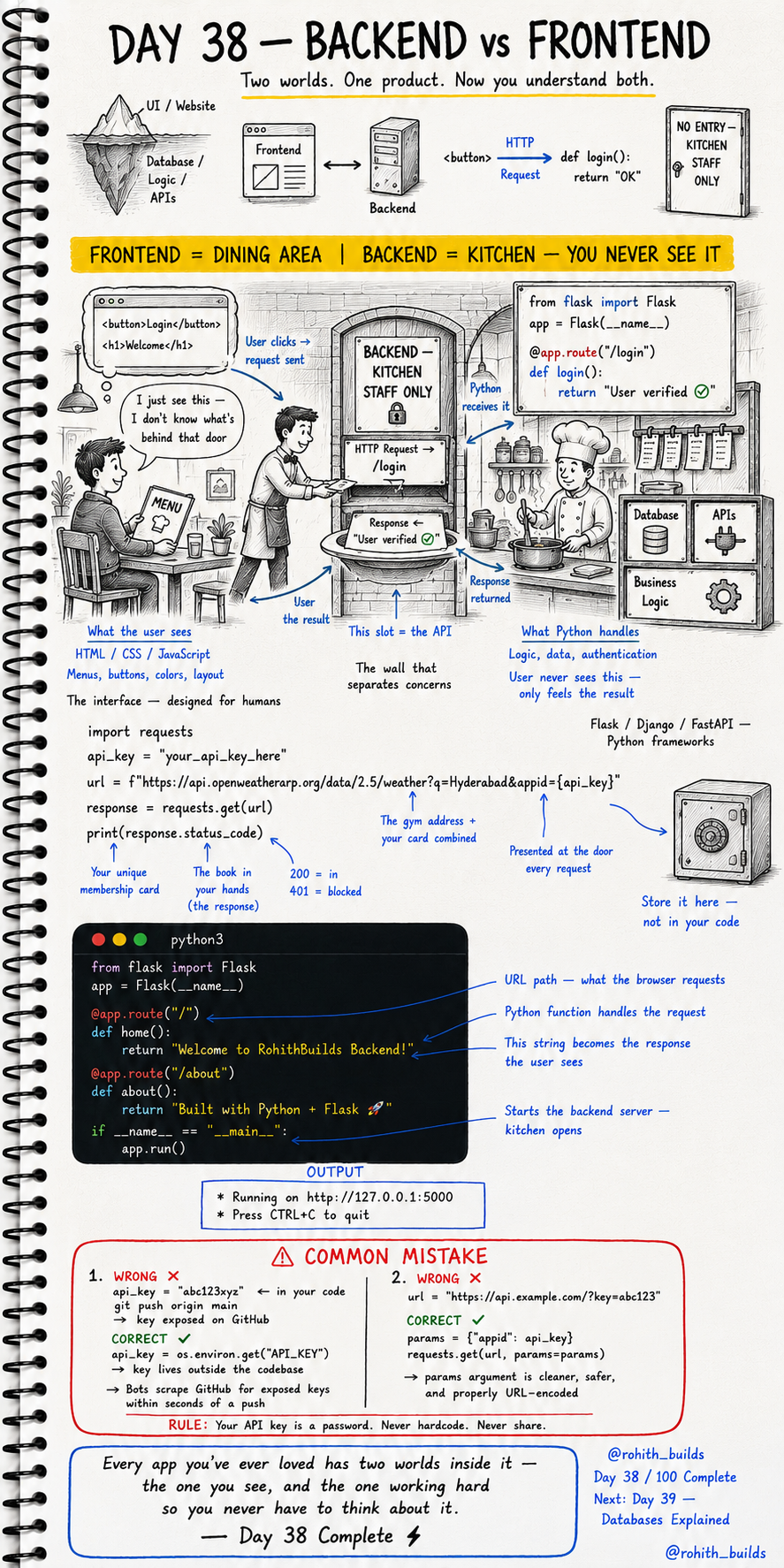
Day 38: Backend vs Frontend — Two Worlds, One App!
The Restaurant Analogy
Walk into a restaurant. You see the dining area — nice tables, menus, waiters, decoration. That's the frontend. Behind that door marked "Kitchen Staff Only" is where the real work happens — cooking, preparing, organizing. You never see it but you feel the result on your plate. That's the backend. Every app you've ever used has both!
Frontend — What You See
Buttons, colors, layouts, animations, text on screen — that's all frontend. Built with HTML, CSS and JavaScript. When you tap Like on Instagram, that's a frontend button. When you see your feed scroll smoothly, that's frontend design. The frontend is the interface designed for humans to interact with!
Backend — What Does the Work
Logic, databases, authentication, APIs — that's all backend. Built with Python, Flask, Django, Node.js. When you tap Like, the backend stores that like in a database. When you log in, the backend verifies your password. When your feed loads, the backend decides which posts to show you. The user never sees it — only feels the result!
Your First Backend With Flask
from flask import Flask

app = Flask(__name__)

@app.route("/")
def home():
    return "Welcome to RohithBuilds Backend!"

@app.route("/about")
def about():
    return "Built with Python + Flask"

if __name__ == "__main__":
    app.run()
Run this and visit http://127.0.0.1:5000 in your browser. You just built a backend server! @app.route("/") means "when someone visits this URL, run this function." The return value is what the user sees. You're now a backend developer!
How They Talk — HTTP
Frontend and backend live in completely separate worlds. They only talk through HTTP requests. User clicks a button (frontend) → browser sends an HTTP request → backend receives it, processes it → backend sends an HTTP response → frontend shows the result. The API is the slot in the wall between them!
Real World Connection
Instagram's frontend is the app on your phone — the beautiful UI. Instagram's backend is thousands of Python and Java servers processing your likes, storing your photos, running the recommendation algorithm. Swiggy's frontend is the ordering screen. The backend tracks drivers, processes payments, notifies restaurants. Every app is this exact split!
Common Mistakes
Mistake 1 — Hardcoding API keys in backend code.
api_key = "abc123xyz"               # WRONG — exposed if code is shared!
api_key = os.environ.get("API_KEY") # CORRECT — stored safely outside code!
Mistake 2 — Putting keys directly in URLs.
url = "https://api.example.com/?key=abc123"  # WRONG!

params = {"appid": api_key}
requests.get(url, params=params)              # CORRECT!
Mini Challenge
Mini Challenge
Install Flask with pip install flask. Create the code above and run it. Visit http://127.0.0.1:5000 and http://127.0.0.1:5000/about in your browser. Then add a third route "/contact" that returns your name and email. You just built a multi-page backend server — exactly what powers every website!
Quick Quiz
Q: What does @app.route("/") do in Flask? A: It tells Flask — when someone visits this URL, run this function!
Q: What language is the backend usually written in for this course? A: Python — using Flask framework!
Q: How do frontend and backend communicate? A: Through HTTP requests and responses — the API is the bridge!
Key Takeaways
Key Takeaways
- Frontend = what users see. Backend = what does the actual work.
- Frontend uses HTML, CSS, JavaScript. Backend uses Python, Flask, databases.
- They communicate through HTTP requests and responses.
- Flask lets you build a Python backend server in just a few lines.
- Every app you love has two worlds — the beautiful dining area and the powerful kitchen!
Continue Learning with Rohi
You've used your 3 free Rohi questions. Create a free account to continue learning.