Data Cleaning 🥦🧹✅
Clean data is not a luxury — it's a requirement. Garbage in, garbage out. Clean first, analyze second. Never skip order!
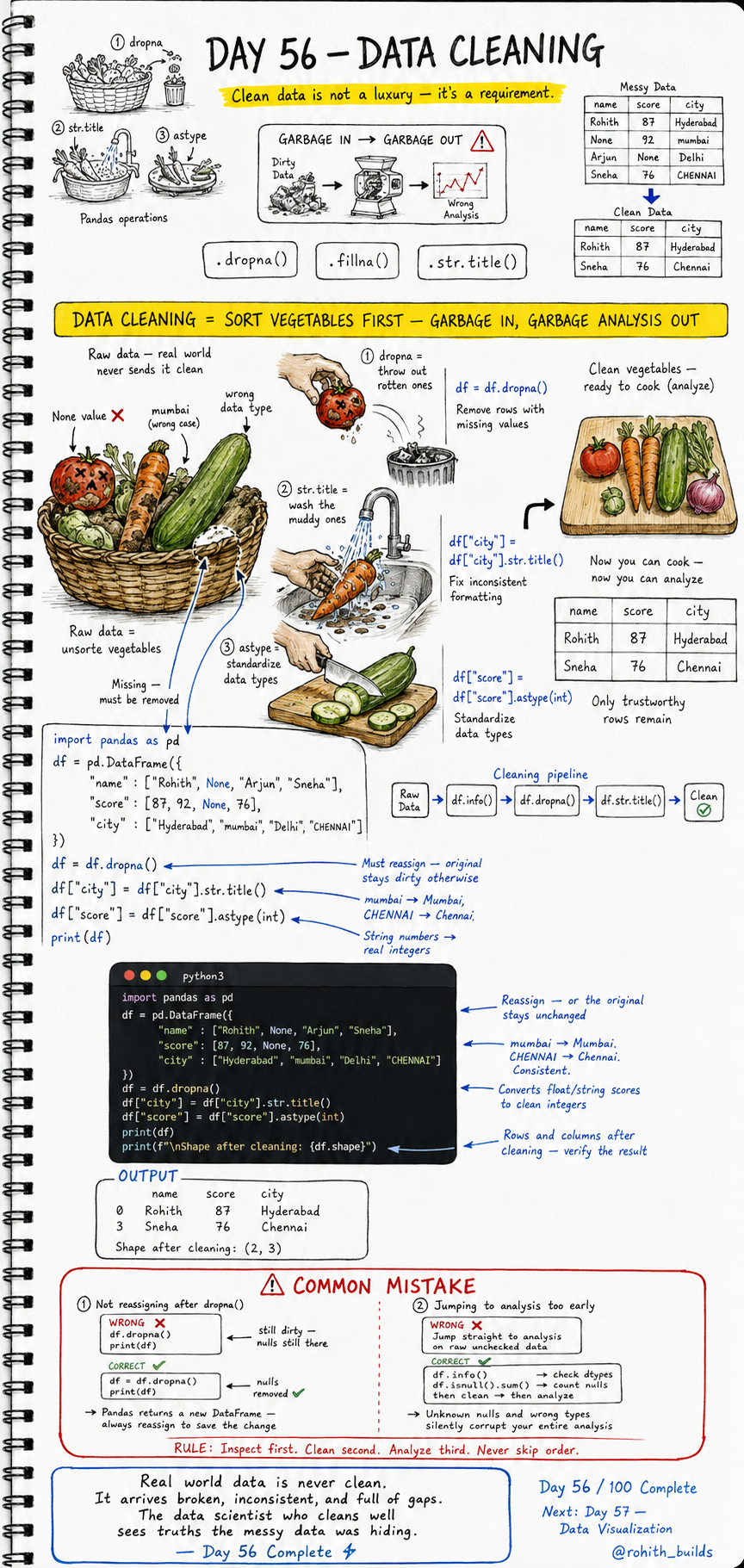
Day 56: Data Cleaning — Sort the Vegetables Before You Cook!
Why Data Cleaning Matters
Imagine cooking a meal with rotten vegetables, muddy carrots and spoiled tomatoes. The dish will be terrible no matter how skilled the chef. Real world data arrives exactly like that — missing values, wrong capitalization, wrong data types, inconsistent entries. Garbage in means garbage analysis out. Clean the data first. Always. No exceptions!
The Messy Data Problem
import pandas as pd

df = pd.DataFrame({
    "name"  : ["Rohith", None, "Arjun", "Sneha"],
    "score" : [87, 92, None, 76],
    "city"  : ["Hyderabad", "mumbai", "Delhi", "CHENNAI"]
})

print(df)
print(f"\nNulls:\n{df.isnull().sum()}")
None values in name and score. "mumbai" instead of "Mumbai". "CHENNAI" in all caps. Wrong types. This is real world data — it arrives broken, inconsistent and full of gaps. df.isnull().sum() counts exactly how many problems you have in each column. Inspect first, always!
The Three Cleaning Operations
# Step 1 — dropna: throw out the rotten ones
df = df.dropna()

# Step 2 — str.title: wash the muddy ones
df["city"] = df["city"].str.title()

# Step 3 — astype: standardize the type
df["score"] = df["score"].astype(int)

print(df)
print(f"\nShape after cleaning: {df.shape}")
Output: Only Rohith and Sneha remain — clean rows only. mumbai becomes Mumbai. CHENNAI becomes Chennai. Score is now a proper integer. Shape is (2, 3). Only trustworthy rows remain — now you can analyze!
The Full Cleaning Pipeline
df.info() first — check data types and spot missing values. df.isnull().sum() — count exactly how many nulls per column. df.dropna() — remove rows with missing values. df["col"].str.title() — fix inconsistent capitalization. df["col"].astype(int) — standardize data types. Then and only then — analyze. This pipeline is the same one every professional data scientist runs on every dataset!
Real World Connection
When a bank analyzes loan applications, 30% of entries have missing income values — dropna() removes them. When an e-commerce site analyzes city-wise sales, cities come in as "mumbai", "MUMBAI", "Mumbai" — str.title() standardizes them. When a hospital analyzes patient ages, some are stored as text "45" not number 45 — astype(int) fixes them. Data cleaning is 70% of every real data science job. The analysis is only 30%!
Common Mistakes
Mistake 1 — Not reassigning after dropna().
df.dropna()       # WRONG — original df stays dirty!
print(df)         # still has nulls!

df = df.dropna()  # CORRECT — reassign to save the change!
print(df)         # now clean!
Mistake 2 — Jumping straight to analysis without cleaning.
# WRONG — unknown nulls and wrong types silently corrupt analysis!
print(df["score"].mean())

# CORRECT — inspect first, clean second, analyze third!
print(df.info())
print(df.isnull().sum())
df = df.dropna()
print(df["score"].mean())
Mini Challenge
Mini Challenge
Create a messy DataFrame with 5 students — include None values in score, wrong case cities like "hyderabad" and "MUMBAI", and score values stored as strings like "87". Run the full cleaning pipeline: inspect with isnull().sum(), drop nulls, fix city case with str.title(), convert score with astype(int). Print shape before and after. You just ran the same cleaning pipeline every data scientist runs before touching any dataset!
Quick Quiz
Q: What does df.dropna() do? A: Removes all rows that contain any missing (None/NaN) values!
Q: Why must you write df = df.dropna() instead of just df.dropna()? A: Pandas returns a new clean DataFrame — without reassigning, the original stays dirty!
Q: What does str.title() do to "mumbai" and "CHENNAI"? A: Converts both to "Mumbai" and "Chennai" — first letter capital, rest lowercase!
Key Takeaways
Key Takeaways
- Clean data is a requirement — garbage in means garbage analysis out.
- Always inspect first — df.info() and df.isnull().sum() before touching anything.
- dropna() removes missing rows. str.title() fixes capitalization. astype() fixes types.
- Always reassign — df = df.dropna() not just df.dropna().
- Inspect first. Clean second. Analyze third. Never skip this order!
Continue Learning with Rohi
You've used your 3 free Rohi questions. Create a free account to continue learning.