API Auth 🔑🌐🛡️
API keys prove who you are. Like a membership card, they unlock access to powerful APIs while keeping everyone else out.
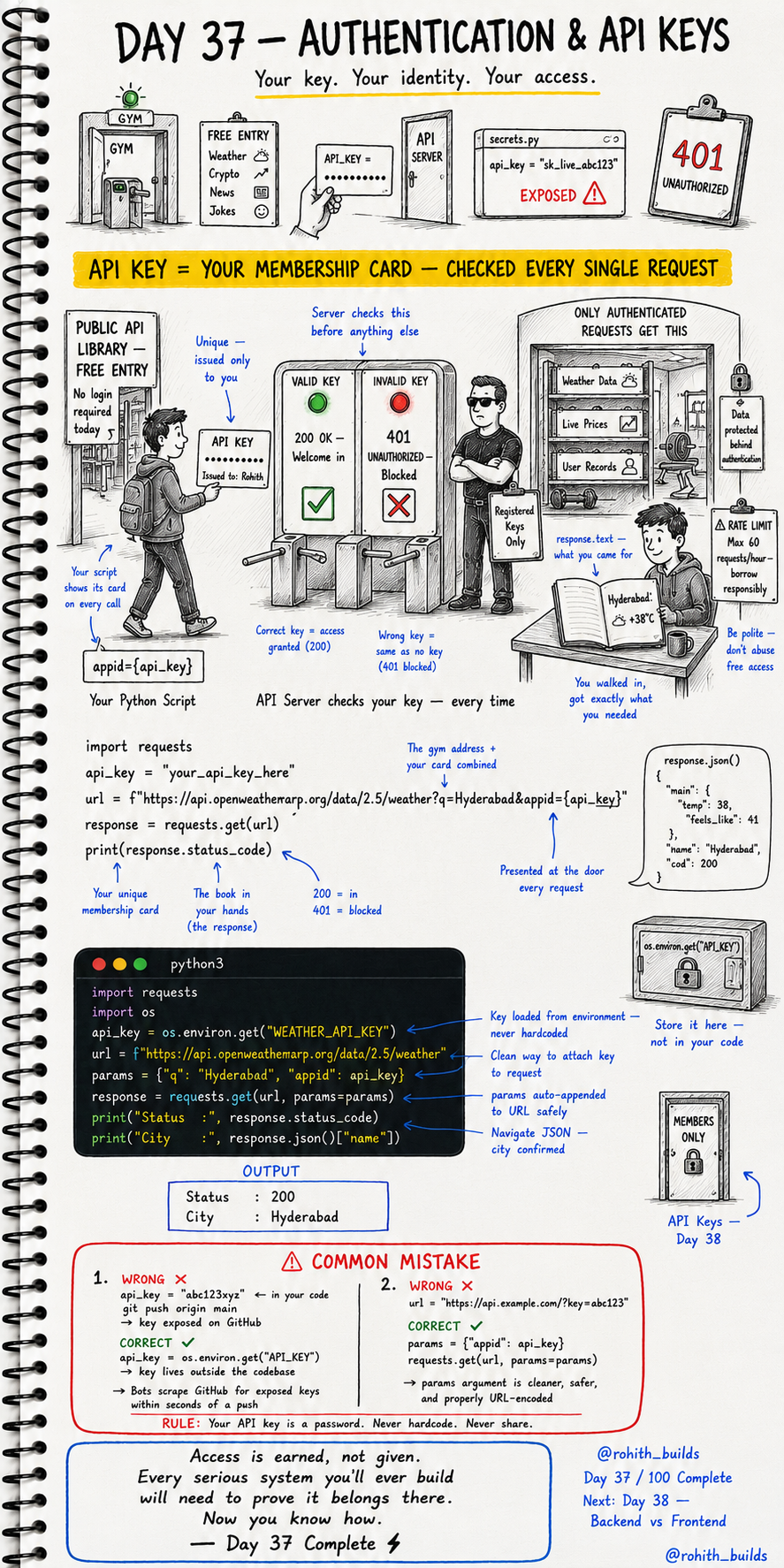
Day 37: Authentication & API Keys — Prove You Belong!
What's an API Key?
Think of a gym. Anyone can walk past it. But only members with a valid membership card can enter. API keys work exactly the same way! Some APIs are free and open to all. But powerful APIs — weather, maps, payments, AI — require you to show your membership card (API key) on every single request. Valid key = 200, welcome in. Invalid key = 401, blocked!
Using an API Key
import requests

api_key = "your_api_key_here"
url = f"https://api.openweathermap.org/data/2.5/weather?q=Hyderabad&appid={api_key}"

response = requests.get(url)
print(response.status_code)
The API key gets attached to the URL. The server checks it before doing anything else. 200 means your key is valid and you're in. 401 means your key is wrong or missing — blocked!
The Right Way — Use params
import requests
import os

api_key = os.environ.get("WEATHER_API_KEY")

url = "https://api.openweathermap.org/data/2.5/weather"
params = {"q": "Hyderabad", "appid": api_key}

response = requests.get(url, params=params)

print("Status :", response.status_code)
print("City   :", response.json()["name"])
params is cleaner and safer than putting everything in the URL manually. requests auto-attaches params to the URL correctly. os.environ.get() loads the key from environment variables — not hardcoded in your file!
NEVER Hardcode Your API Key
Your API key is a password. Treat it like one! If you put it directly in your code and push to GitHub, bots scan GitHub 24/7 and steal exposed keys within seconds. Then they use your key, hit your rate limits, or run up charges on your account!
api_key = "abc123xyz"               # WRONG — exposed in code!
api_key = os.environ.get("API_KEY") # CORRECT — lives outside code!
Real World Connection
Every app that uses Google Maps has a Maps API key. Every app that sends emails has a SendGrid API key. Every app using AI has an OpenAI API key. Uber, Swiggy, Zomato — all of them authenticate with API keys to use the services they're built on. This is how the professional world works!
Common Mistakes
Mistake 1 — Hardcoding the key in your code.
api_key = "sk_live_abc123"          # WRONG — never in your code!
api_key = os.environ.get("API_KEY") # CORRECT — load from environment!
Mistake 2 — Putting keys directly in the URL string.
url = "https://api.example.com/?key=abc123"  # WRONG — messy and unsafe!

params = {"appid": api_key}
requests.get(url, params=params)             # CORRECT — clean and safe!
Mini Challenge
Mini Challenge
Sign up for a free OpenWeatherMap account at openweathermap.org and get your free API key. Store it in a variable. Use it to fetch weather for your city. Print the temperature and weather description. You just used a real authenticated API — exactly how professional apps work!
Quick Quiz
Q: What status code means your API key is wrong or missing? A: 401 — Unauthorized. Show a valid key or you're blocked!
Q: Why use params instead of putting keys in the URL? A: Cleaner, safer and properly URL-encoded automatically by requests!
Q: Where should you store your API key? A: Environment variables — never hardcoded in your code files!
Key Takeaways
Key Takeaways
- API keys are membership cards — show them on every request to get access.
- Valid key = 200 success. Invalid or missing key = 401 unauthorized.
- Use params= in requests.get() instead of building keys into the URL.
- Never hardcode API keys in your code — use environment variables!
- Every serious app authenticates — now you know exactly how it works!
Continue Learning with Rohi
You've used your 3 free Rohi questions. Create a free account to continue learning.