System Design 🏗️⚡🚀
Day 50 — halfway to AI Engineer! Now you think like a systems engineer. Every piece planned before traffic arrives!
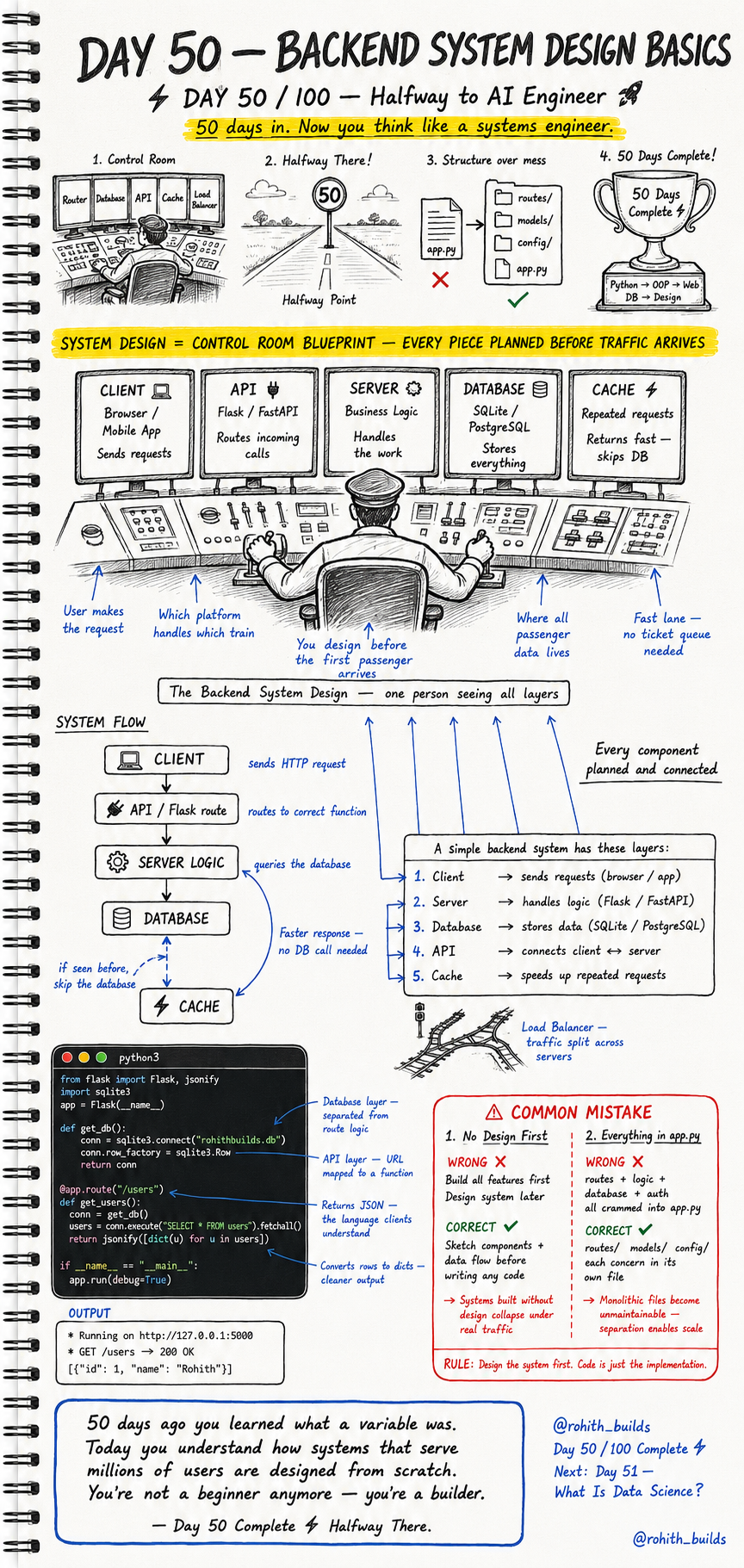
Day 50: Backend System Design — Think Like a Systems Engineer!
Halfway There — 50 Days!
50 days ago you learned what a variable was. Today you understand how systems that serve millions of users are designed from scratch. Python, OOP, Web, Databases, Design — all of it lives in your head now. You're not a beginner anymore. You're a builder. Today you learn to think like the engineer who designs the entire control room before the first user arrives!
System Design = Control Room Blueprint
Think of a railway control room. One person sees every track, every train, every signal at once. They designed the system before the first passenger arrived. Backend system design is exactly that — planning every component, every connection, every data flow before writing a single line of code. Design the system first. Code is just the implementation!
The Five Layers of Every Backend System
Client — browser or mobile app that sends requests. API — Flask or FastAPI that routes incoming calls to the right function. Server Logic — the business logic that handles the actual work. Database — SQLite or PostgreSQL that stores everything permanently. Cache — stores repeated responses so fast it skips the database entirely. Every backend system on earth is these five layers talking to each other!
The System Flow in Code
from flask import Flask, jsonify
import sqlite3

app = Flask(__name__)

def get_db():
    conn = sqlite3.connect("rohithbuilds.db")
    conn.row_factory = sqlite3.Row
    return conn

@app.route("/users")
def get_users():
    conn = get_db()
    users = conn.execute("SELECT * FROM users").fetchall()
    return jsonify([dict(u) for u in users])

if __name__ == "__main__":
    app.run(debug=True)
Client sends GET /users request. Flask route receives it and calls get_users(). Server logic queries the database. Database returns the rows. jsonify converts them to JSON the client understands. Output: Running on http://127.0.0.1:5000, GET /users returns user data. Every layer doing its job!
Structure Over Mess
Wrong way — everything crammed into one app.py file. Routes, logic, database, auth, config — one giant file. Right way — routes/ for URL handlers, models/ for database logic, config/ for settings, app.py just starts the server. Monolithic files collapse under real traffic. Separation enables scale. Every company with millions of users organizes code this way!
Real World Connection
When you open Swiggy, your phone (Client) sends a request to Swiggy's API. The API routes it to the right server function. Server logic queries the database for nearby restaurants. If you searched recently, Cache returns it instantly without hitting the database. Response comes back as JSON. Your app displays it. That five-layer flow happens in under 200 milliseconds every single time!
Common Mistakes
Mistake 1 — Building features before designing the system.
Always sketch components and data flow before writing any code. Systems built without design collapse under real traffic. A 5-minute sketch saves 5 days of refactoring!
Mistake 2 — Everything in one file.
# WRONG — routes + logic + database + auth all in app.py!

# CORRECT — separated concerns!
# routes/    — URL handlers
# models/    — database logic
# config/    — settings
# app.py     — just starts the server
Mini Challenge
Mini Challenge
Draw the system design for a simple todo app on paper. Identify all five layers — client, API, server logic, database, cache. What does each layer do? What data flows between them? Then build the Flask route that returns all todos from a SQLite database as JSON. You're now designing systems the same way engineers at Swiggy and Zomato do!
Quick Quiz
Q: What is the role of the Cache layer? A: Stores repeated responses so they return instantly — skips the database for speed!
Q: What does jsonify() do in Flask? A: Converts Python dictionaries and lists into JSON format that clients can read!
Q: Why separate code into routes/, models/, config/ folders? A: Each concern in its own file — monolithic files become unmaintainable at scale!
Key Takeaways
Key Takeaways
- Every backend has five layers — Client, API, Server Logic, Database, Cache.
- Design the system before writing code — sketch components and data flow first.
- Separate routes, models and config into their own files — never one giant app.py.
- jsonify() converts Python data to JSON — the language every client understands.
- You're halfway to AI Engineer — and you now think like a systems builder!
Continue Learning with Rohi
You've used your 3 free Rohi questions. Create a free account to continue learning.