APIs 🔌🌐⚡
Learn how APIs let your apps connect to maps, payments, weather, AI, and other powerful services without building everything from scratch.
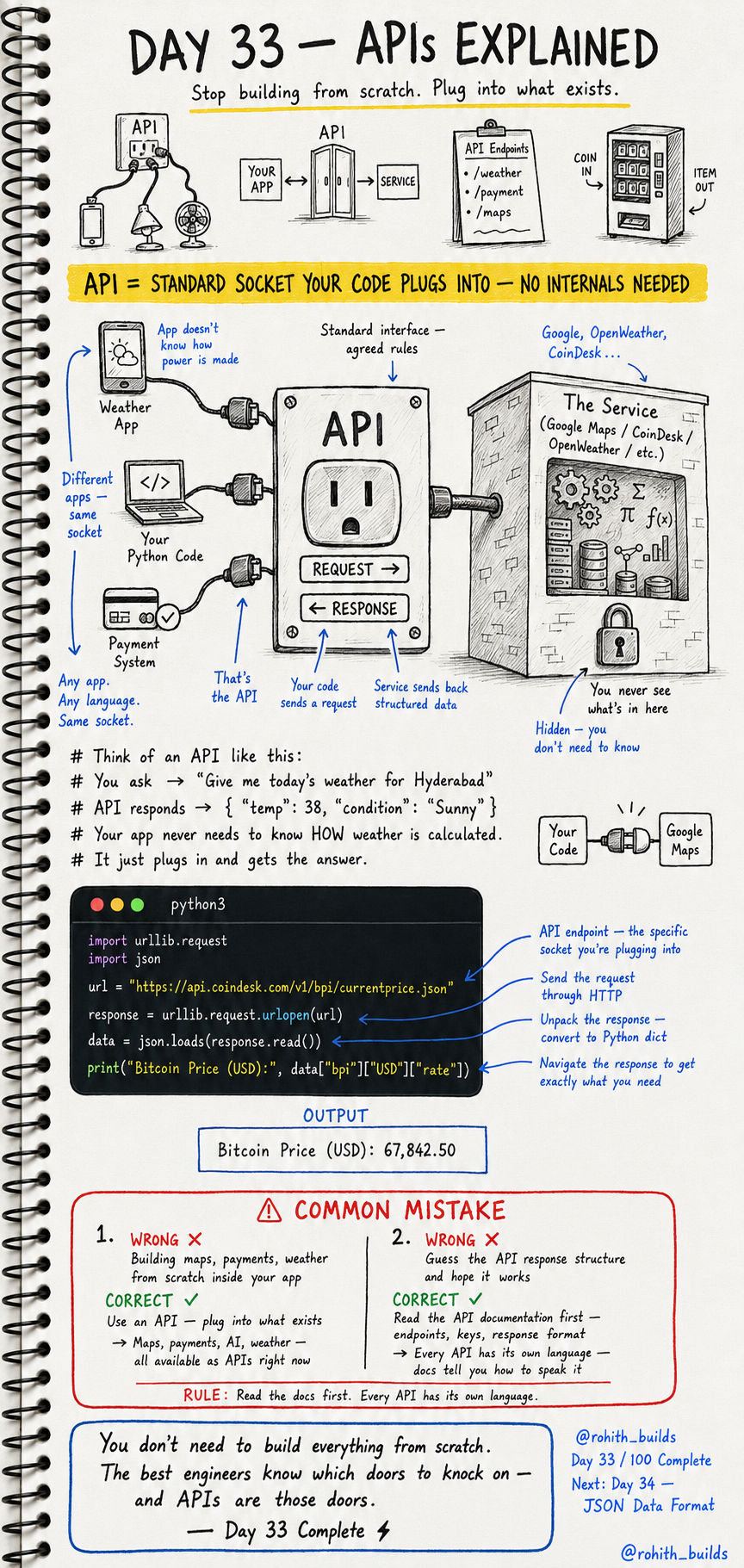
Day 33: APIs — Plug Into What Already Exists!
What's an API?
Think of an electric socket on your wall. You don't know how electricity is generated. You don't need to build a power plant. You just plug in and get power. An API is exactly that — a standard socket your code plugs into. Plug into Google Maps and get navigation. Plug into a weather API and get real weather data. Plug into a payment API and process money. No internals needed!
How It Works
Your code sends a REQUEST to the API endpoint. The service processes it invisibly. The API sends back a RESPONSE with structured data. You use that data in your app. You never see how the service works internally — you just get the result!
Your First Real API Call
import urllib.request
import json

url = "https://api.coindesk.com/v1/bpi/currentprice.json"
response = urllib.request.urlopen(url)
data = json.loads(response.read())

print("Bitcoin Price (USD):", data["bpi"]["USD"]["rate"])
Output: Bitcoin Price (USD): 67,842.50. Your Python just connected to a real API, got live Bitcoin price data from the internet, and printed it. That's a real working app feature in 5 lines!
Real World Connection
Swiggy doesn't build its own maps — it plugs into Google Maps API. Paytm doesn't build its own bank — it plugs into banking APIs. Every weather app you've used plugs into a weather API. ChatGPT itself is an API — companies plug into it to add AI to their apps. The best apps are built by knowing which doors to knock on!
API Endpoints — Specific Doors
# Different endpoints = different doors to different data
# /weather  → gives weather data
# /payment  → processes payments
# /maps     → gives map and directions

# Example structure:
# https://api.example.com/weather?city=Hyderabad
# https://api.example.com/payment/process
An API can have many endpoints — each one gives different data or does a different action. Like a building with many doors, each leading to a different room!
Common Mistakes
Mistake 1 — Building from scratch what an API already provides.
Need maps? Don't build maps. Use Google Maps API. Need payments? Don't build a payment system. Use Razorpay API. Need weather? Use OpenWeather API. APIs exist for almost everything!
Mistake 2 — Guessing the response structure.
data["temperature"]    # WRONG — guessing the key name!

# Read the API docs first, then use the correct structure
data["main"]["temp"]   # CORRECT — from OpenWeather docs
Mini Challenge
Mini Challenge
Run the Bitcoin price code above. Then try changing the code to print the Euro price instead of USD — hint: look for "EUR" instead of "USD" in the data. You're navigating real API data from the live internet. That's professional developer work!
Quick Quiz
Q: What's an API endpoint? A: A specific URL that gives specific data or performs a specific action!
Q: Do you need to know how an API works internally? A: Never! You just send a request and use the response. The internals are hidden!
Q: Why use an API instead of building the feature yourself? A: APIs give you professional-grade features instantly — maps, payments, AI — in minutes not months!
Key Takeaways
Key Takeaways
- APIs are standard sockets — plug in your code and get powerful features instantly.
- Send a request to an endpoint, get structured data back as response.
- Always read the API documentation first — every API has its own structure.
- Never build from scratch what an API already provides.
- Maps, payments, weather, AI — all available as APIs right now!
Continue Learning with Rohi
You've used your 3 free Rohi questions. Create a free account to continue learning.