HTTP 🌐📨🖥️
Understand how browsers and servers communicate. Every website visit is a request and response conversation!
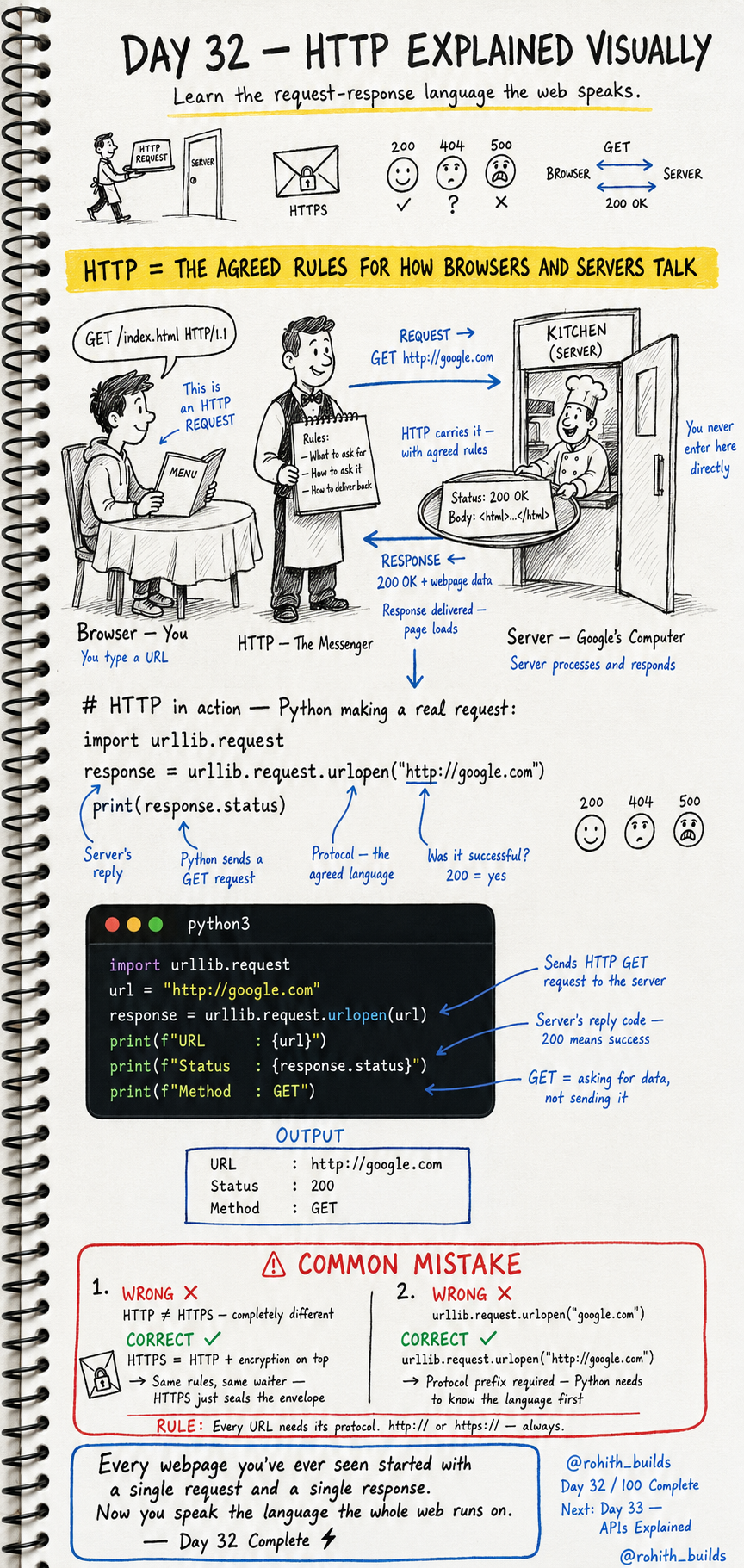
Day 32: HTTP — The Language the Web Speaks!
What's HTTP?
Imagine a restaurant. You're the customer (browser). The kitchen is the server. The waiter carrying orders between you is HTTP. You tell the waiter what you want (request). The kitchen prepares it and sends it back through the waiter (response). HTTP is just the agreed rules for how browsers and servers talk to each other!
Request and Response
Every time you visit a website, two things happen. Your browser sends a REQUEST — "give me google.com please." The server sends a RESPONSE — "here's the page, status 200 OK." That's it. The entire web runs on this one pattern. Request. Response. Every single time!
Status Codes — The Server's Reply
200 = Success! Everything worked perfectly. 404 = Not Found. The page doesn't exist. 500 = Server Error. Something broke on the server's side. You've seen 404 pages before — now you know what it means!
HTTP in Python
import urllib.request

url = "[http://google.com](http://google.com)"
response = urllib.request.urlopen(url)

print(f"URL    : {url}")
print(f"Status : {response.status}")
print(f"Method : GET")
Output: URL: http://google.com, Status: 200, Method: GET. Your Python just sent an HTTP request to Google and got a response back! Status 200 means success. GET means you're asking for data, not sending it!
GET vs POST — The Two Main Methods
GET = asking for data. When you open Instagram your browser GETs the page. POST = sending data. When you log in, your browser POSTs your username and password to the server. GET is like asking the waiter for the menu. POST is like placing your order!
Real World Connection
Every YouTube video you watch — your browser sends a GET request for that video. Every Google search — GET request with your search term. Every login on any website — POST request with your credentials. Every Instagram like — POST request telling the server you liked it. You've been using HTTP thousands of times a day without knowing it!
HTTP vs HTTPS
HTTP and HTTPS work exactly the same way — same request, same response, same waiter. But HTTPS seals the envelope with encryption first. Nobody can read what's inside as it travels. Same rules, just locked. Always use HTTPS for anything sensitive — passwords, payments, personal data!
Common Mistakes
Mistake 1 — Thinking HTTP and HTTPS are completely different.
They're the same rules. HTTPS just adds encryption on top. Same waiter, sealed envelope!
Mistake 2 — Forgetting the protocol prefix.
urllib.request.urlopen("google.com")         # WRONG — no protocol!
urllib.request.urlopen("http://google.com")  # CORRECT
Mini Challenge
Mini Challenge
Use urllib.request to check the status of 3 different websites. Print the URL and status code for each. If you get 200 the site responded successfully. You're literally checking if websites are alive — the same thing monitoring tools like UptimeRobot do professionally!
Quick Quiz
Q: What does status code 404 mean? A: Page not found — the URL you requested doesn't exist on that server!
Q: What's the difference between GET and POST? A: GET fetches data. POST sends data. Opening a page = GET. Logging in = POST!
Q: What does HTTPS add on top of HTTP? A: Encryption — the data is sealed so nobody can read it while travelling!
Key Takeaways
Key Takeaways
- HTTP is the agreed language browsers and servers use to communicate.
- Every web interaction is a request followed by a response.
- 200 = success. 404 = not found. 500 = server error.
- GET fetches data. POST sends data to the server.
- HTTPS is HTTP with encryption — same rules, sealed envelope!
Continue Learning with Rohi
You've used your 3 free Rohi questions. Create a free account to continue learning.