Filtering Data 🔍✅📊
Stop fetching everything. Use WHERE to fetch only what matters — like Swiggy's filter panel but for your database!
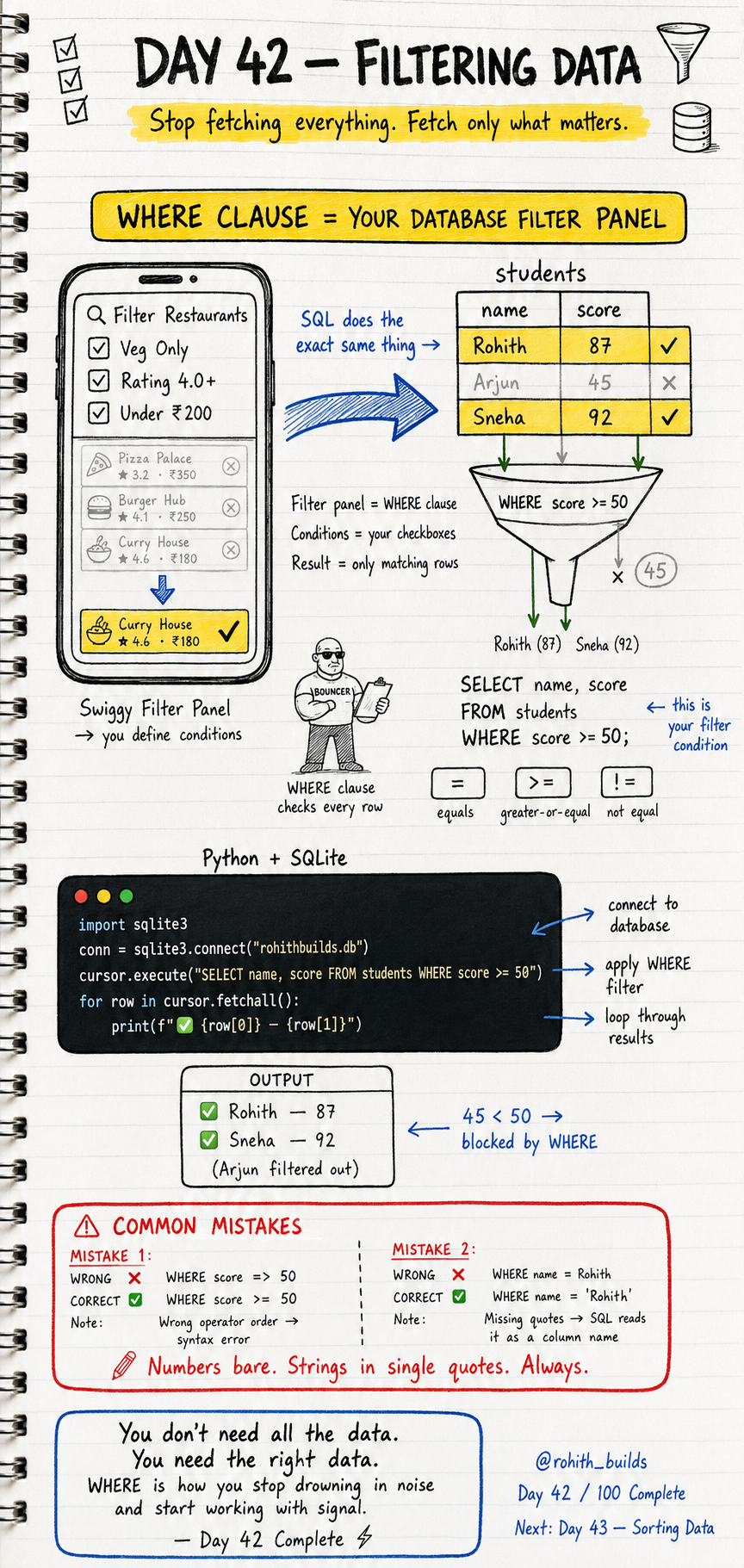
Day 42: Filtering Data — Fetch Only What Matters!
What Is Filtering?
Open Swiggy and tap the filter button. Veg only. Rating 4.0+. Under 200 rupees. Instantly only matching restaurants appear. You didn't scroll through everything — you set conditions and got exactly what you wanted. SQL WHERE does the exact same thing for your database!
WHERE — Your Database Filter Panel
import sqlite3

conn = sqlite3.connect("rohithbuilds.db")
cursor = conn.cursor()

cursor.execute("SELECT name, score FROM students WHERE score >= 50")
for row in cursor.fetchall():
    print(f"{row[0]} - {row[1]}")
Output: Rohith 87, Sneha 92. Arjun with 45 is blocked by WHERE. The database checked every row, kept only the ones matching your condition, and returned just those. You didn't write a single Python if statement — SQL did all the filtering!
The Filter Operators
WHERE score = 87       -- exact match
WHERE score >= 50      -- greater than or equal
WHERE score != 45      -- not equal
WHERE score > 80       -- greater than
WHERE score < 50       -- less than
WHERE name = 'Rohith'  -- text match needs single quotes
Numbers go bare — no quotes. Strings always need single quotes. Mix them up and SQL either crashes or gives wrong results!
Multiple Filters With AND and OR
-- Both conditions must match
SELECT name, score FROM students WHERE score >= 50 AND score <= 90

-- Either condition can match
SELECT name, score FROM students WHERE score < 50 OR score > 90
AND = both checkboxes must be ticked. OR = either checkbox is enough. Just like Swiggy letting you filter by rating AND price together!
Real World Connection
Zomato showing veg restaurants under 200 rupees — WHERE is_veg = 1 AND price_for_two less than 200. Instagram showing posts from people you follow — WHERE user_id IN your following list. Amazon showing products in stock under 1000 rupees — WHERE price less than 1000 AND in_stock = 1. Every filter panel in every app is a WHERE clause!
Common Mistakes
Mistake 1 — Wrong operator order.
WHERE score => 50   -- WRONG — syntax error!
WHERE score >= 50   -- CORRECT — greater than or equal
Mistake 2 — Missing quotes around text values.
WHERE name = Rohith    -- WRONG — SQL thinks Rohith is a column name!
WHERE name = 'Rohith'  -- CORRECT — single quotes for text always!
Mini Challenge
Mini Challenge
Insert 5 students with different scores. Write 3 WHERE queries: one to get students who passed (score >= 50), one to get students who scored exactly 87, and one to get students who failed OR scored above 90. Print all results. You just built the same filtering system every education app uses to track student performance!
Quick Quiz
Q: How do you filter for students named Rohith in SQL? A: WHERE name = 'Rohith' — single quotes around text always!
Q: What's the difference between AND and OR in WHERE? A: AND requires both conditions true. OR requires just one to be true!
Q: Is WHERE score => 50 correct? A: No! It's >= not =>. Wrong order causes a syntax error!
Key Takeaways
Key Takeaways
- WHERE is your database filter panel — only matching rows are returned.
- Use =, >=, <=, !=, >, less than to compare values.
- Numbers go bare. Strings always need single quotes in SQL.
- AND requires both conditions. OR requires just one.
- Every filter panel in every app is just a WHERE clause — now you can build them!
Continue Learning with Rohi
You've used your 3 free Rohi questions. Create a free account to continue learning.