AI Workflows ⚙️🤖🚀
Learn how to build AI automation workflows that run end-to-end with zero human input — one trigger fires every step automatically, with error handling at each stage and human gates before any irreversible action.
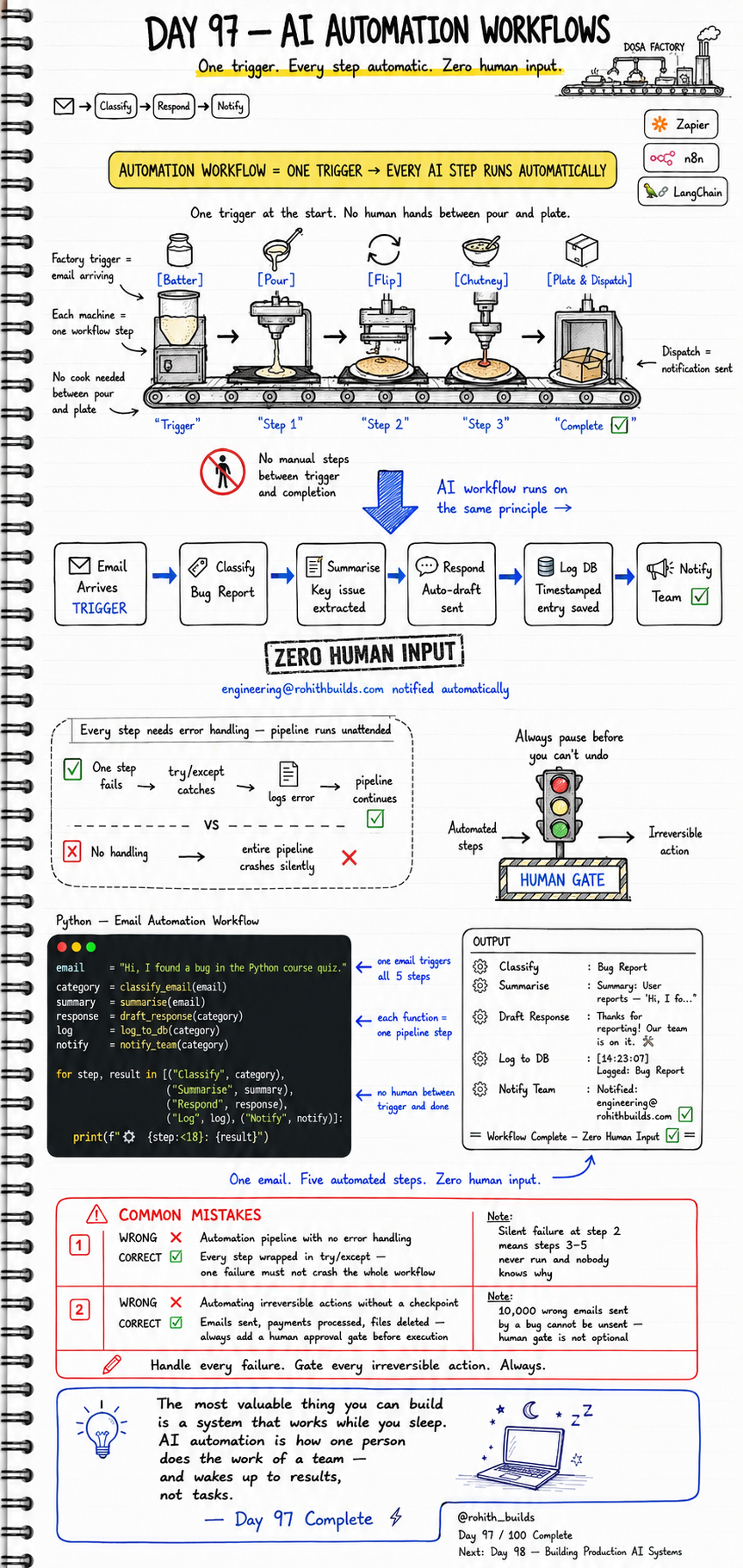
Day 97: AI Automation Workflows
Why Should I Care?
The most valuable thing you can build is a system that works while you sleep. AI automation is how one person does the work of a team — and wakes up to results, not tasks. Right now, every bug report email that hits your inbox needs you to read it, classify it, draft a reply, log it, and notify the team. That is five manual steps for every single email. Automation collapses all five into one trigger. One email arrives. Five steps run. Zero human input. That is what today builds.
Core Concept
An automation workflow is a chain of steps connected to a single trigger. When the trigger fires, every step runs automatically in sequence — no human hands between start and finish. The formula: one trigger plus every AI step runs automatically equals a complete automation workflow. No manual steps between trigger and completion. No cook needed between pour and plate. Every step needs error handling — because the pipeline runs unattended and a silent failure at step 2 means steps 3 through 5 never run and nobody knows why.
How It Works
Think of a dosa factory assembly line. One trigger at the start — batter loaded. Machine 1 pours. Machine 2 flips. Machine 3 adds chutney. Machine 4 plates and dispatches. No cook needed between pour and plate. Each machine does one job and passes the result forward. An AI automation workflow is the same principle. One trigger — email arrives. Step 1 classifies the email as a bug report. Step 2 summarises the key issue. Step 3 drafts an auto-response. Step 4 logs a timestamped entry to the database. Step 5 notifies the engineering team. Zero human input. engineering@rohithbuilds.com notified automatically.
Email Arrives (TRIGGER)
    |
Classify     --> Bug Report identified
    |
Summarise    --> Key issue extracted
    |
Respond      --> Auto-draft response sent
    |
Log DB       --> Timestamped entry saved
    |
Notify Team  --> engineering@ notified

= Workflow Complete -- Zero Human Input =
Real World Connection
When you report a bug on Swiggy and instantly get an automated acknowledgement email — that is an automation workflow firing. When your bank sends you a fraud alert SMS the moment a suspicious transaction is detected — trigger, classify, notify, all automated. When a new user signs up on RohithBuilds and immediately gets a welcome email with their first lesson — one trigger, five steps, zero human. Tools like Zapier, n8n, and LangChain are built entirely on this one idea: one trigger, every step automatic. You do not need any of those tools to build this. Pure Python is enough. Today you build it from scratch.
Examples
email    = "Hi, I found a bug in the Python course quiz."

category = classify_email(email)
summary  = summarise(email)
response = draft_response(category)
log      = log_to_db(category)
notify   = notify_team(category)

steps = [
    ("Classify",  category),
    ("Summarise", summary),
    ("Respond",   response),
    ("Log",       log),
    ("Notify",    notify)
]

for step, result in steps:
    print(f"  {step:<18}: {result}")

# OUTPUT:
# Classify   : Bug Report
# Summarise  : Summary: User reports "Hi, I fo..."
# Respond    : Thanks for reporting! Our team is on it.
# Log to DB  : [14:23:07] Logged: Bug Report
# Notify     : Notified: engineering@rohithbuilds.com
#
# = Workflow Complete -- Zero Human Input =
# One email. Five automated steps. Zero human input.
Common Mistakes
Mistake 1 — Automation pipeline with no error handling:
-- WRONG:
def run_workflow(email):
    category = classify_email(email)
    summary  = summarise(email)
    response = draft_response(category)
    log_to_db(category)
    notify_team(category)
# one step fails -- entire pipeline crashes silently
# steps 3 to 5 never run -- nobody knows why

-- CORRECT:
def run_step(name, fn, *args):
    try:
        result = fn(*args)
        return result
    except Exception as e:
        log_error(name, e)
        return f"Step {name} failed -- continuing"
# one failure caught -- pipeline continues
# every step wrapped in try/except -- unattended pipelines demand it
Mistake 2 — Automating irreversible actions without a checkpoint:
-- WRONG:
def run_workflow(data):
    process_payment(data)     # irreversible
    send_10000_emails(data)   # irreversible -- no human check
    delete_old_records(data)  # irreversible

-- CORRECT:
def run_workflow(data):
    classified = classify(data)
    summarised = summarise(data)
    if requires_human_approval(classified):
        request_human_gate(classified, summarised)
        return
    process_payment(data)
# emails sent, payments processed, files deleted --
# always add a human approval gate before irreversible execution
# 10,000 wrong emails sent by a bug cannot be unsent
Mini Challenge
Mini Challenge
Build a five-step automation workflow in Python for this scenario: a new course signup arrives. Step 1 classifies the user type — beginner or advanced. Step 2 generates a personalised welcome message. Step 3 logs the signup with a timestamp. Step 4 sends the welcome message to print. Step 5 notifies a fake admin email. Wrap every step in try/except. Run the whole thing with one function call and one input string. Watch five things happen from one trigger. That is your automation workflow. Ship it.
Quick Quiz
Q: What is a human gate and when must you use one?
A: A human gate is a pause in the workflow that requires manual approval before the next step runs. It must be used before any irreversible action — emails sent, payments processed, records deleted — because automated bugs cannot be undone.
Q: Why does every step in an unattended pipeline need its own try/except block?
A: Because a silent failure at any step stops the rest of the pipeline from running and nobody knows why. Each step catching its own error lets the pipeline log the failure and continue instead of crashing.
Q: What is the single most important design rule for automation workflows?
A: One trigger starts everything. No manual steps between trigger and completion. Handle every failure. Gate every irreversible action. Always.
Bonus Knowledge
Tools like Zapier and n8n are just visual interfaces built on top of exactly this pattern — trigger, steps, error handling, completion. LangChain adds AI reasoning between steps — instead of fixed classify functions, each step can use an LLM to decide what to do next. That is called an agentic workflow — the AI decides the next step based on context, not a fixed script. Day 96 covered multi-agent orchestration. Day 97 is the pipeline that runs those agents automatically. Stack them together: agents make decisions, workflows run them automatically, production systems keep them alive. That is the full picture of how real AI products operate at scale.
Key Takeaways
Key Takeaways
- An automation workflow is one trigger connected to every step — no human hands between start and finish.
- Every step must have its own try/except block — a silent failure in an unattended pipeline is invisible without it.
- Always add a human gate before irreversible actions — emails sent, payments processed, and files deleted cannot be undone.
- Each function in the pipeline does one job and passes its result to the next step — same as a factory assembly line.
- One email. Five automated steps. Zero human input. That is the power of automation workflows.
- Tools like Zapier, n8n, and LangChain are all built on this same one-trigger pattern — now you can build it yourself.
- AI automation is how one person does the work of a team — and wakes up to results, not tasks.
Continue Learning with Rohi
You've used your 3 free Rohi questions. Create a free account to continue learning.