Agent Tools 🛠️⚡🤖
Learn how AI agents use tools to take real-world actions — the LLM is the brain that decides which tool to call, when, and why, while each tool does exactly one precise job and chains its output to the next step.
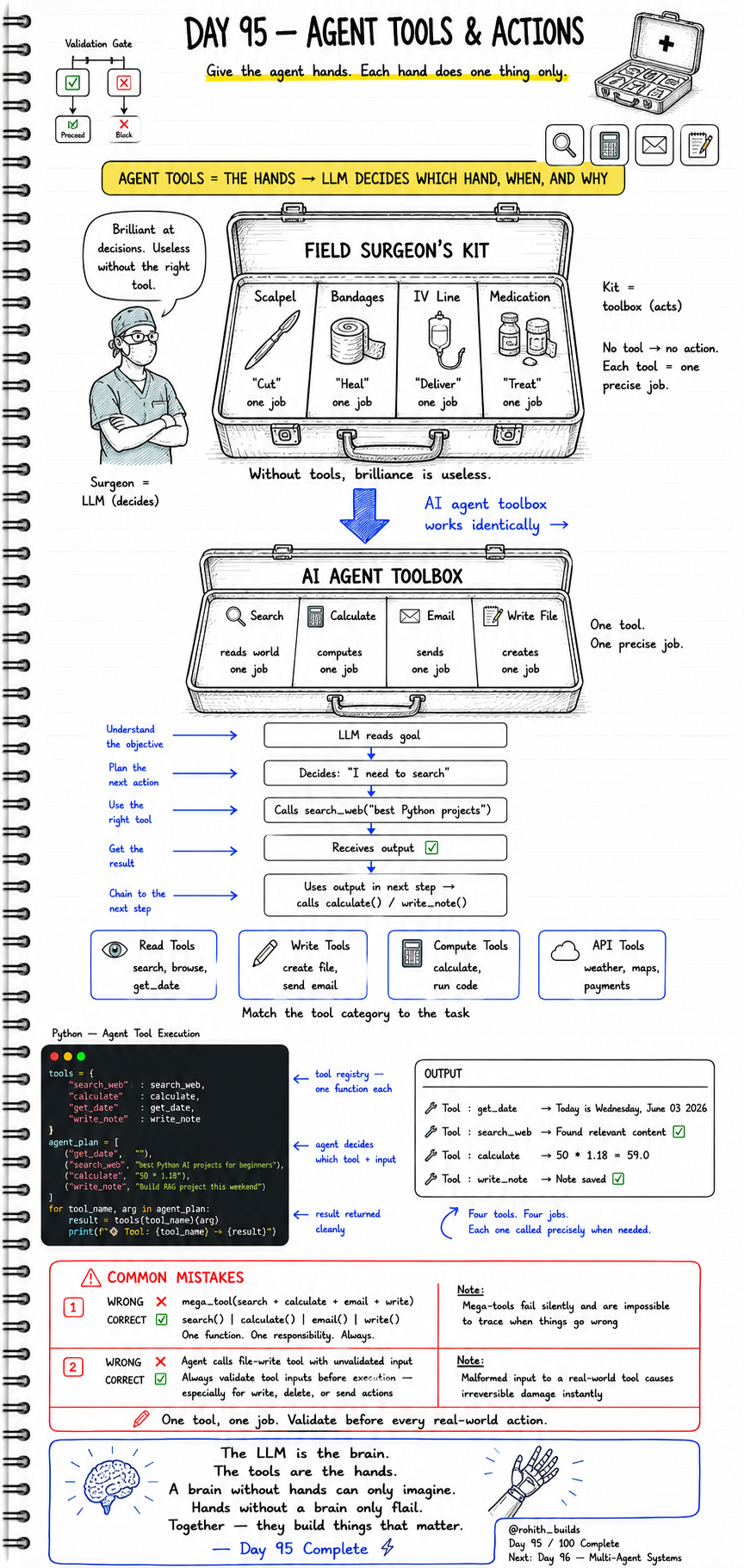
Day 95: Agent Tools & Actions
Why Should I Care?
An LLM without tools is like a surgeon without a kit. Brilliant at decisions. Useless without the right instrument. The LLM can reason about anything — but it cannot search the web, run a calculation, send an email, or save a file on its own. Tools give the agent hands. Each hand does one thing only. Without tools, all that intelligence stays locked inside the model. With tools, it reaches into the real world and actually does things. That is the difference between a chatbot and an agent.
Core Concept
Agent tools are the hands of the AI. The LLM is the brain that decides which hand to use, when, and why. Each tool has one precise job — no tool does two things. Search reads the world. Calculate computes numbers. Email sends messages. Write File creates documents. The agent loop works in five steps: read the goal, decide which tool is needed, call that tool with the right input, receive the output, chain it to the next step. No tool means no action. One tool. One job. One clean result. Always.
How It Works
Think of a field surgeon''s kit. The surgeon is the LLM — brilliant at decisions. The kit is the toolbox. Scalpel cuts — one job. Bandages heal — one job. IV line delivers — one job. Medication treats — one job. Without the kit, brilliance is useless. Without tools, the agent is just a very smart text box. The AI agent toolbox works identically. Four tool categories cover every real-world action an agent needs to take. Read Tools — search, browse, get_date — pull information from the world. Write Tools — create file, send email — push output into the world. Compute Tools — calculate, run code — process data. API Tools — weather, maps, payments — connect to external services. Match the tool category to the task. The LLM decides which one to call.
LLM reads goal
    |
Decides: "I need to search"
    |
Calls search_web("best Python projects")
    |
Receives output
    |
Uses output in next step --> calls calculate() / write_note()

Read Tools    : search, browse, get_date
Write Tools   : create file, send email
Compute Tools : calculate, run code
API Tools     : weather, maps, payments
Real World Connection
When you ask Google Assistant to "set a reminder for 8PM and send a message to Rohith" — two tools fire in sequence. The reminder tool writes to your calendar. The message tool sends via WhatsApp. The LLM decided which tool to call for which part of your request. When an AI coding assistant in VS Code searches documentation, runs your code, and writes the fix to the file — three tools fired: search, run code, write file. When a PhonePe AI agent detects a suspicious transaction, looks up your history, calculates a risk score, and sends you an alert — four tools, one agent, zero human steps. Every smart AI product you use is an LLM choosing from a toolbox. Now you build the toolbox yourself.
Examples
tools = {
    "search_web"  : search_web,
    "calculate"   : calculate,
    "get_date"    : get_date,
    "write_note"  : write_note
}

agent_plan = [
    ("get_date",    ""),
    ("search_web",  "best Python AI projects for beginners"),
    ("calculate",   "50 * 1.18"),
    ("write_note",  "Build RAG project this weekend")
]

for tool_name, arg in agent_plan:
    result = tools[tool_name](arg)
    print(f"  Tool : {tool_name} --> {result}")

# OUTPUT:
# Tool : get_date    --> Today is Wednesday, June 03 2026
# Tool : search_web  --> Found relevant content
# Tool : calculate   --> 50 * 1.18 = 59.0
# Tool : write_note  --> Note saved
#
# Four tools. Four jobs.
# Each one called precisely when needed.
Common Mistakes
Mistake 1 — Building one mega-tool that does everything:
-- WRONG:
def mega_tool(query):
    search_result  = search(query)
    calculated     = calculate(query)
    email_sent     = email(query)
    file_written   = write(query)
    return all_results
# mega-tools fail silently and are impossible to trace
# when things go wrong you have no idea which part broke

-- CORRECT:
def search_web(query): ...
def calculate(expr):   ...
def send_email(msg):   ...
def write_note(text):  ...
# one function, one responsibility, always
# when search fails you know exactly where to look
Mistake 2 — Calling tools with unvalidated input:
-- WRONG:
result = tools["write_note"](raw_llm_output)
# malformed input to a real-world tool causes
# irreversible damage instantly
# a bad write_note call could overwrite real files

-- CORRECT:
def validated_tool_call(tool_name, arg):
    if not arg or not isinstance(arg, str):
        return "Invalid input -- tool call blocked"
    if tool_name not in tools:
        return f"Unknown tool: {tool_name}"
    return tools[tool_name](arg)
# always validate tool inputs before execution
# especially for write, delete, or send actions
# one tool, one job -- validate before every real-world action
Mini Challenge
Mini Challenge
Build your own agent toolbox in Python with four tools: get_date, search_web, calculate, and write_note. Each tool is just a function that returns a fake result string for now. Build a tool registry dictionary that maps tool names to functions. Write an agent plan — a list of (tool_name, input) tuples — with four steps. Loop through the plan, call each tool, and print the result. Add input validation before every tool call so bad inputs are blocked cleanly. Run it. Watch four tools fire in sequence. That is your first agent toolbox. Ship it.
Quick Quiz
Q: What is the difference between the LLM and the tools in an agent system?
A: The LLM is the brain — it reads the goal, reasons about what needs to happen, and decides which tool to call and when. The tools are the hands — they take real-world actions the LLM cannot do on its own.
Q: Why should each tool do exactly one job?
A: Because mega-tools fail silently and are impossible to trace. When a single-responsibility tool fails, you know exactly which step broke and why. One tool, one job means clean debugging and reliable pipelines.
Q: Why must you validate tool inputs before execution?
A: Because malformed input to a real-world tool causes irreversible damage instantly — a bad write or delete call cannot be undone. Always validate before write, delete, or send actions.
Bonus Knowledge
In production agent systems, tools are registered with schemas — a description of what the tool does, what inputs it expects, and what it returns. The LLM reads these schemas and decides autonomously which tool to call based on the goal — no hardcoded plan needed. This is called function calling or tool use — it is built into models like GPT-4 and Claude natively. The validation gate pattern — check input before executing, block bad calls before they reach real-world actions — is the same pattern used in every production agent pipeline at scale. The LLM is the brain. The tools are the hands. A brain without hands can only imagine. Hands without a brain can only flail. Together they build things that matter.
Key Takeaways
Key Takeaways
- Agent tools are the hands of the AI — without them the LLM can reason but cannot act in the real world.
- The LLM is the brain that decides which tool to call, when, and why based on the goal.
- Each tool has exactly one job — search reads, calculate computes, email sends, write file creates. Never combine jobs into one tool.
- Four tool categories cover every real-world action: Read Tools, Write Tools, Compute Tools, and API Tools.
- Always validate tool inputs before execution — especially for write, delete, and send actions that cannot be undone.
- Mega-tools fail silently and are impossible to trace — single-responsibility tools make every failure findable.
- The LLM is the brain. The tools are the hands. Together they build things that matter.
Continue Learning with Rohi
You've used your 3 free Rohi questions. Create a free account to continue learning.