Context Windows 🧠🪟⚡
Learn how AI models use a fixed-size context window as their working memory, why older messages get dropped when it fills up, and how to write smarter prompts that stay within limits.
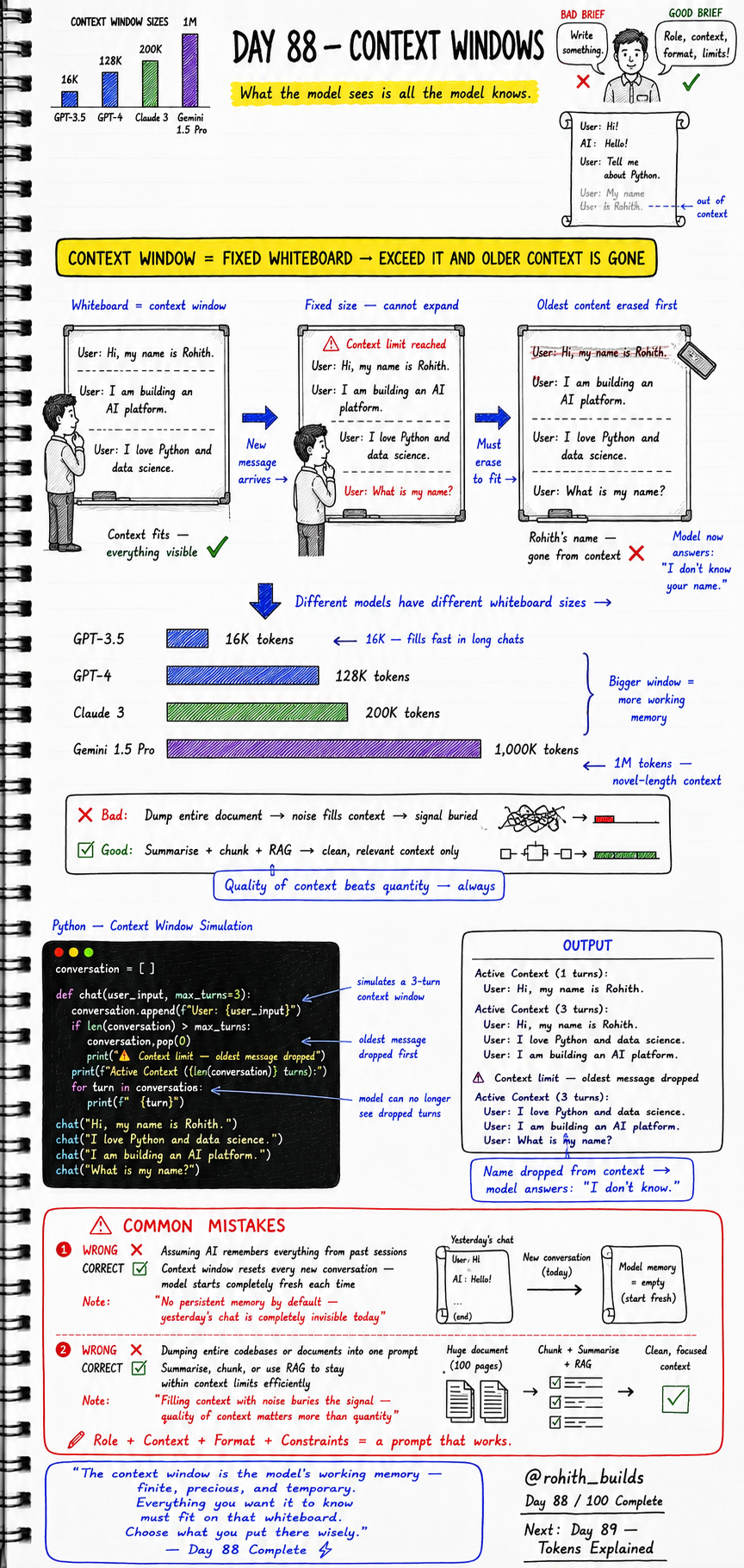
Day 88: Context Windows — What AI Can See and Remember
Why Should I Care?
Ever chatted with an AI for a long time and it suddenly forgot your name? That is not a bug. That is the context window running out of space. Understanding this helps you talk to AI smarter and get way better results.
Core Concept
A context window is like a whiteboard. The AI can only see what is written on that whiteboard right now. Once the whiteboard is full, the oldest stuff gets erased to make room for new messages. The AI does not have a memory beyond what fits on that whiteboard.
How It Works
Every word, sentence, and message you send takes up space on the whiteboard. Different AI models have different whiteboard sizes measured in tokens. When you go over the limit, the oldest messages vanish from the AI''s view completely. It is not ignoring you — it literally cannot see that old message anymore.
GPT-3.5   -->  16,000 tokens   (fills fast in long chats)
GPT-4     -->  128,000 tokens
Claude 3  -->  200,000 tokens
Gemini 1.5 Pro  -->  1,000,000 tokens  (novel-length context!)

Rule: Bigger window = more working memory for the AI
Real World Connection
Think of WhatsApp. Imagine you can only see the last 10 messages on screen. Scroll up and you see older ones — but an AI cannot scroll up. Once a message leaves the window, it is gone from the AI''s brain forever. This is exactly why a ChatGPT session you had yesterday is completely invisible to the AI today. Every new conversation starts fresh like a clean whiteboard.
Examples
# Python simulation of a 3-turn context window

conversation = []

def chat(user_input, max_turns=3):
    conversation.append(f"User: {user_input}")
    if len(conversation) > max_turns:
        conversation.pop(0)  # oldest message dropped first
        print("Context limit reached — oldest message dropped")
    print(f"Active Context ({len(conversation)} turns):")
    for turn in conversation:
        print(f"  {turn}")

chat("Hi, my name is Rohith.")
chat("I love Python and data science.")
chat("I am building an AI platform.")
chat("What is my name?")

# OUTPUT:
# Active Context (3 turns):
#   User: I love Python and data science.
#   User: I am building an AI platform.
#   User: What is my name?
#
# The AI answers: "I don''t know your name."
# Because "Hi, my name is Rohith." was dropped!
Common Mistakes
Two big mistakes beginners make with context windows. First, assuming the AI remembers old sessions. Second, dumping huge documents into one prompt and wondering why the AI gives bad answers.
-- MISTAKE 1 --

WRONG:
  Start a new chat and ask: "Remember what I told you yesterday?"
  The AI says: "I don''t know what you told me."

CORRECT:
  Paste the important info at the start of every new conversation.
  Context window resets every session — model starts fresh each time.

NOTE: "No persistent memory by default —
       yesterday''s chat is completely invisible today."


-- MISTAKE 2 --

WRONG:
  Paste your entire 100-page codebase into one prompt.
  Result: noise fills the context, signal gets buried.

CORRECT:
  Summarise + chunk your content + use RAG techniques
  to keep only clean, relevant context inside the window.

NOTE: "Filling context with noise buries the signal —
       quality of context matters more than quantity."
Mini Challenge
Mini Challenge
Open any AI chat tool like ChatGPT or Claude. Start a conversation by telling it your name and your favourite app. Then send 5 more long messages after that. Finally ask the AI: "What is my name?" See if it still remembers. If it forgets, you just witnessed a context window overflow in real life! Screenshot it and share.
Quick Quiz
Q1: What happens when the context window is full and a new message arrives? A1: The oldest message is dropped to make room for the new one. Q2: If you start a new chat with an AI today, can it remember your conversation from yesterday? A2: No. Every new conversation starts with a completely empty context window. Q3: Which model has the largest context window from the ones shown in this lesson? A3: Gemini 1.5 Pro with 1,000,000 tokens.
Bonus Knowledge
There is a technique called RAG — Retrieval Augmented Generation. Instead of dumping a huge document into the prompt, RAG fetches only the most relevant chunks and puts them into the context window. This keeps the window clean and the AI focused. Big companies like Google, Zomato, and Swiggy use RAG-style systems so their AI assistants can answer questions from massive databases without blowing up the context limit. Quality of context always beats quantity.
Key Takeaways
Key Takeaways
- The context window is the AI''s working memory — everything it can currently see and use.
- It is fixed in size and measured in tokens — once full, the oldest content is erased first.
- Different models have different window sizes: GPT-3.5 is 16K, Claude 3 is 200K, Gemini 1.5 Pro is 1M.
- AI has no memory between separate conversations — every new chat starts with a blank whiteboard.
- Never dump huge files into one prompt — summarise, chunk, and use RAG for clean focused context.
- Role plus context plus format plus constraints equals a prompt that actually works.
Continue Learning with Rohi
You've used your 3 free Rohi questions. Create a free account to continue learning.